The Adobe Photoshop 7.0 serial number is a 24-digit number supplied with a genuine licensed copy. Look on your registration card and inside the cover of your CD holder. This site does not publish, generate or share any serial number. If you searched for "adobe photoshop 7.0 free download full version with key for windows 10", we offer no such download.
What is the Adobe Photoshop 7.0 serial number?
It is the number the setup program asks for before it will install Photoshop 7.0 on your computer. The Read Me file supplied with the program calls it a 24-digit serial number. It tells owners to look for it on the registration card or on the inside cover of the CD holder.
Adobe released Photoshop 7.0 in 2002, for Windows and Macintosh. At that time, software usually arrived in a box with discs, printed material and a number. That number went with the licence you paid for.
How the number is laid out on screen
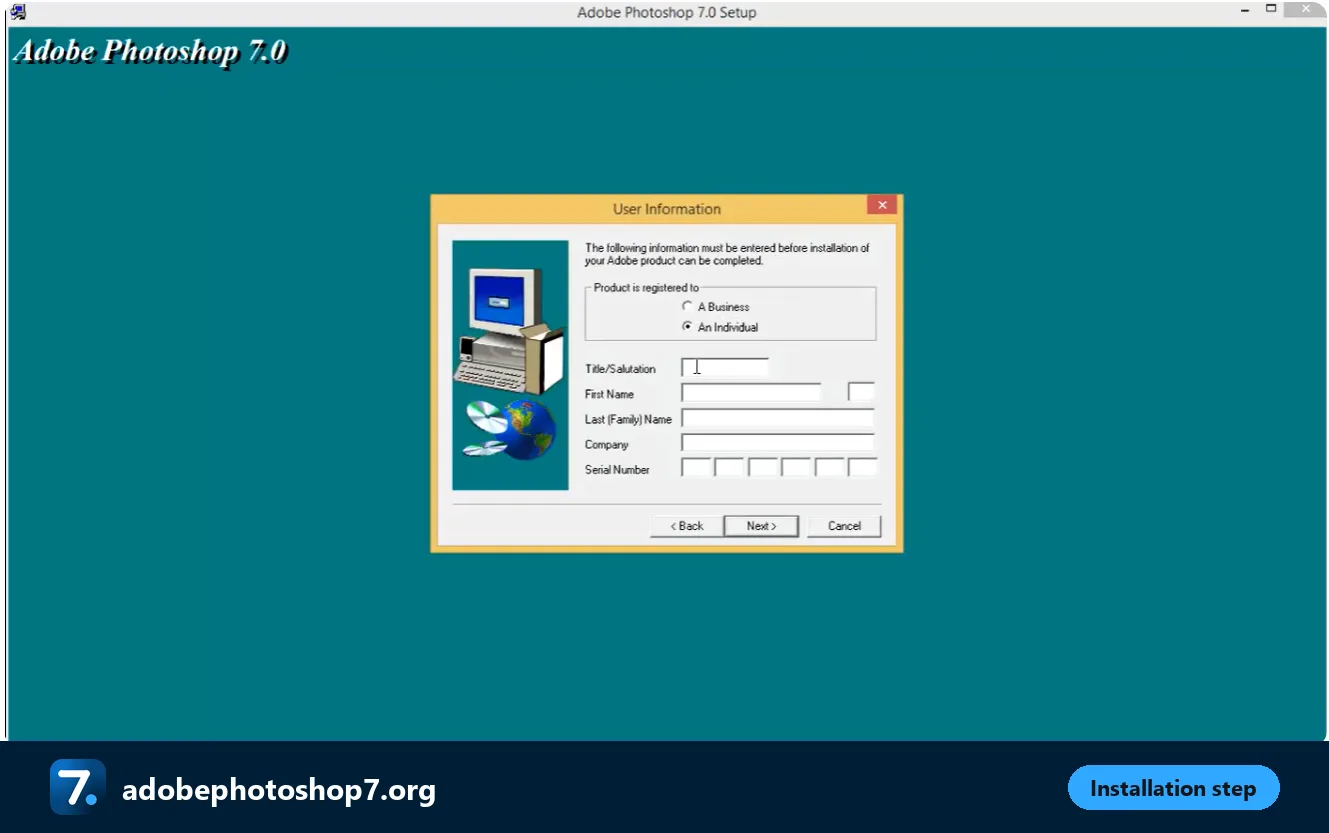
The Windows installer shows six small boxes next to the words "Serial Number". Together they take the 24 digits, so each box holds four. You type the digits only, from your own card or CD holder.
We do not show a sample number anywhere, not even a made-up one. A sample helps nobody who owns the software, because your own card already shows the real one.
Serial number, product key, registration: the difference
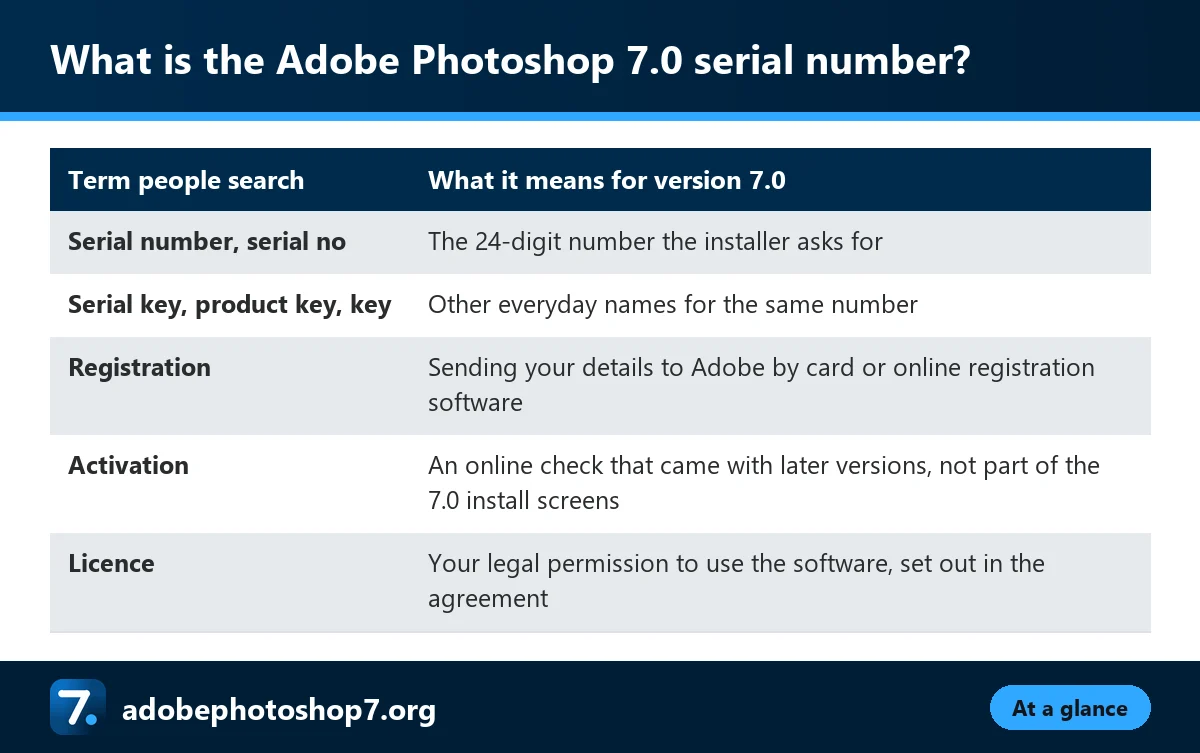
People use these words loosely, so a short table helps.
| Term people search | What it means for version 7.0 |
|---|---|
| Serial number, serial no | The 24-digit number the installer asks for |
| Serial key, product key, key | Other everyday names for the same number |
| Registration | Sending your details to Adobe by card or online registration software |
| Activation | An online check that came with later versions, not part of the 7.0 install screens |
| Licence | Your legal permission to use the software, set out in the agreement |
The most important line is the last one. A number is only the thing you type. The licence is what makes typing it lawful.
Why there is no lawful serial number list
No list of Photoshop 7.0 serial numbers is lawful to share or use. Each number belongs with a licence that somebody bought, or was issued by Adobe to a particular customer. A "serial number list" on a blog, a video or a code site is a collection of numbers the reader has no right to use.
It does not matter that the page calls them "free" or "for education only". Copying a number from there does not give you a licence. Our page will not point you to any such list.
What this page gives you, and what it does not
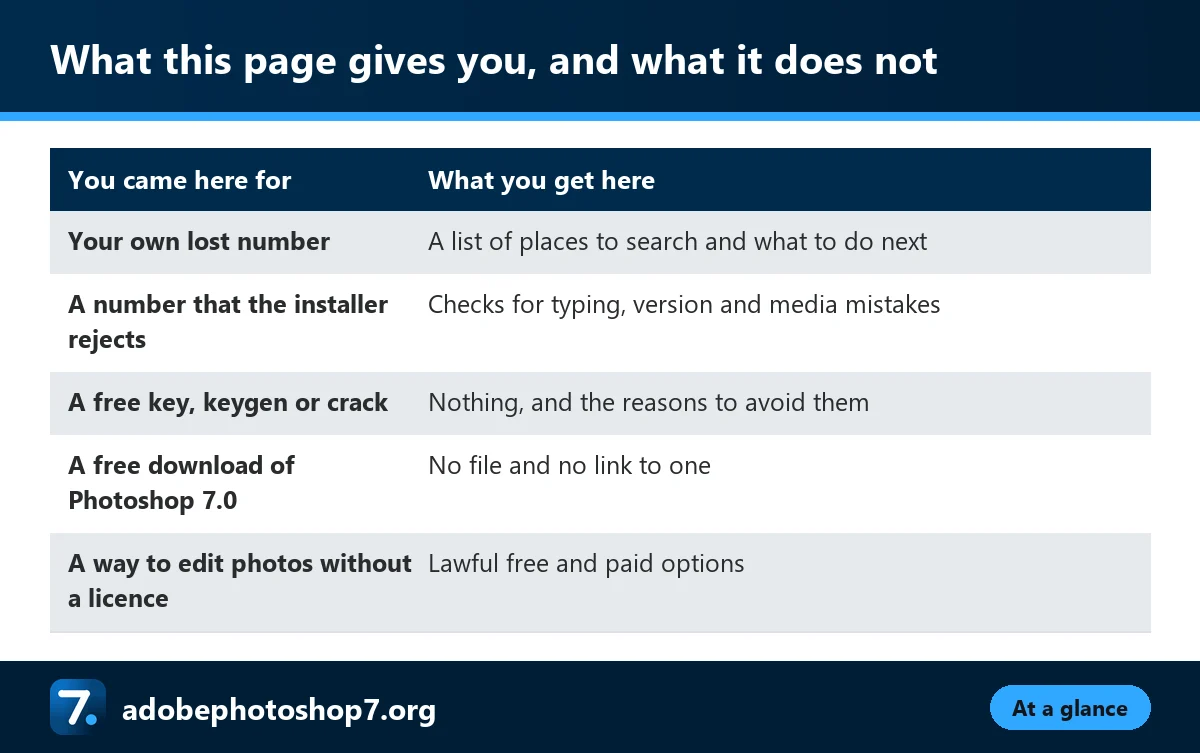
This page helps genuine owners and warns everyone else away from piracy. It is part of an independent site, not run or approved by Adobe.
| You came here for | What you get here |
|---|---|
| Your own lost number | A list of places to search and what to do next |
| A number that the installer rejects | Checks for typing, version and media mistakes |
| A free key, keygen or crack | Nothing, and the reasons to avoid them |
| A free download of Photoshop 7.0 | No file and no link to one |
| A way to edit photos without a licence | Lawful free and paid options |
About "free download with serial key" searches
Searches such as "adobe photoshop 7.0 download with serial key" ask for two things we cannot give. We host no installer, and we share no number. Pages that offer both together are offering somebody else's property.
If you own the licence but not the disc, read our page on the Photoshop 7.0 download question. It explains what Adobe does and does not provide today.
Photoshop 7.0 is not freeware
Photoshop 7.0 is still Adobe's proprietary software. Adobe no longer sells it or offers it for download, but that does not turn it into free software. Age does not cancel the licence terms, and "abandonware" is not a permission anyone has given you.
So the rule is simple. To install it, you need your own genuine licence, with its media and number.
Where to find your own Photoshop 7.0 serial number
Start with the packaging and papers that came with your purchase, because that is where the Read Me file sends you. Then work outwards to records and old computers.
| Where to look | What to look for | How likely it is to help |
|---|---|---|
| Inside cover of the CD holder | A printed label or number near the disc | Named in the Read Me file |
| Registration card | The number on the card or on a part you kept | Named in the Read Me file |
| Retail box | Labels and loose papers inside | Worth checking |
| Invoice or purchase file | The number noted by you, your office or the seller | Depends on your record keeping |
| Email and old documents | Order messages, scanned cards, licence notes | Depends on how you bought it |
| Your Adobe account | Products registered to that account | Only if it was registered and still shows |
| An old installation you own | The number shown by the installed program | Only if the copy was installed with your licence |
The CD holder and disc sleeve
Open the CD case or sleeve fully and look at the inner faces. Labels are easy to miss behind a booklet or under the tray. If you moved the discs into a CD wallet years ago, search for the empty original case too.
Do not rely on writing on the disc itself. A number written with a marker pen could have come from anyone. Match it against your printed material before you trust it.
The registration card
The Read Me file asked buyers to complete the registration card and post it, or to use the online registration software. If you posted it, you may have torn off and kept one portion, or photocopied it. Check the folder where you keep warranty cards and bills.
If you never posted it, the card may still be in the box. Keep it even after you note the number down.
Upgrade packages have their own number
An upgrade copy of 7.0 comes with a new 24-digit number on the inside cover of its CD holder. The Read Me file says plainly that the number used to install earlier versions will not install 7.0.
This catches many owners. They find an old Photoshop 6.0 card, type that number and think the disc is faulty. Search for the 7.0 upgrade holder instead, and keep your older version's proof as well, because an upgrade depends on it.
Invoices, emails and office records
Your purchase proof may not show the number, but it can lead you to it. Look for:
- the shop's or reseller's invoice, with date and product name;
- an order confirmation email, if the purchase was made online;
- a scanned copy of the card in an old "software" or "bills" folder;
- an office asset register, if your employer bought the software;
- a note from the person who set up the studio computers.
If a reseller sold it to your business, ask whether they still hold the order. They may not after so many years, but one phone call costs little.
Your Adobe account
Sign in to the Adobe account you used for registration, if you have one, and look at the registered products section. Adobe's help page on finding serial numbers describes this route for purchases recorded in an account. A 2002 purchase may well not appear, especially if you registered by post.
Do not create a new account and expect your old number to be there. An account can only show what was linked to it.
Checking an old installation you own
If Photoshop 7.0 still runs on a computer that was set up with your licence, the program itself may help you recover your details. This is for your own copy only.
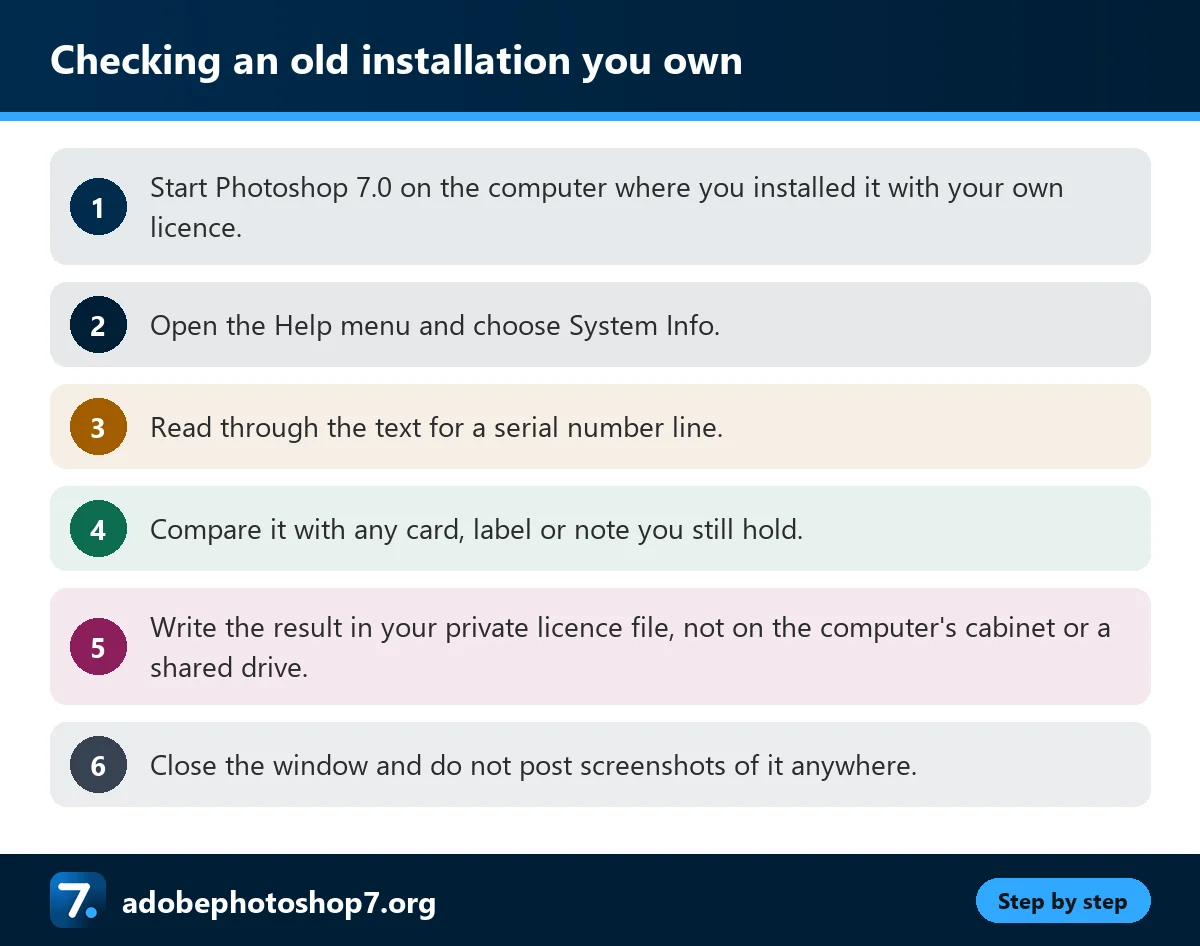
Adobe community users report that the number can be seen from the Help menu, under System Info, in an installed copy. Menu contents can differ between copies, so check yours and treat what you see with care.
- Start Photoshop 7.0 on the computer where you installed it with your own licence.
- Open the Help menu and choose System Info.
- Read through the text for a serial number line.
- Compare it with any card, label or note you still hold.
- Write the result in your private licence file, not on the computer's cabinet or a shared drive.
- Close the window and do not post screenshots of it anywhere.
If the line is missing or partly hidden, stop there. We do not give registry tricks or suggest "key finder" programs. Tools that read keys are easy to misuse, and download pages for them are a common place to pick up unwanted software.
An old computer or hard disk in storage
An old PC in the storeroom may still start. Before you switch it on, check the power cable and the cabinet for damage, and keep it off the internet. An unpatched old system should not browse or check email.
If the machine boots and the program opens, note your details and copy your own work files. If only the hard disk survives, a technician may recover your documents from it. That does not mean the installed program can be copied across to a new computer. Copying program folders is not a proper installation.
Whose licence is on that computer?
Finding a number on a computer does not make it yours. This matters with second-hand PCs, a former tenant's machine, a cyber café system or a computer repaired by someone who "put Photoshop on it".
Ask one question: can I show that I, or my business, bought or lawfully received this licence? If you cannot, do not reuse the number. Uninstall the copy if you do not know its source.
A one-hour search plan for a lost card
A planned search works better than opening random drawers. Give it an hour and follow this order.
- Write down when and where the software was bought, and by whom.
- Collect every Adobe disc, case, box and booklet in the house or studio.
- Open each case and check both inner covers.
- Go through bill files for the purchase year and the year after.
- Search your email for the words Adobe, Photoshop, invoice and registration.
- Ask former partners, the office accountant or the family member who bought it.
- Check any old computer that you know was installed from your discs.
- Record what you found, even if it is only the invoice.
Keep the proof you find together. Even without the number, an invoice or a registration record helps you if you contact Adobe.
Places people often forget
CD wallets, drawer organisers and camera shop carry bags are frequent hiding places. So are the pockets of old laptop cases, scanner and printer boxes, and files kept for tax purposes. If your studio moved premises, check the carton marked "computer papers" before you give up.
Where the serial number goes during installation
You enter it on the User Information screen, after accepting the licence agreement. The screens below are from the Windows installer. Our step-by-step installation page covers every other screen.
The User Information screen
Choose "A Business" or "An Individual" under "Product is registered to". Fill in Title/Salutation, your names and, if relevant, the company. Then type your own serial number in the six boxes and click Next.
Use your real details. A business licence should be in the business name, not in the name of whoever happened to do the installation that day.
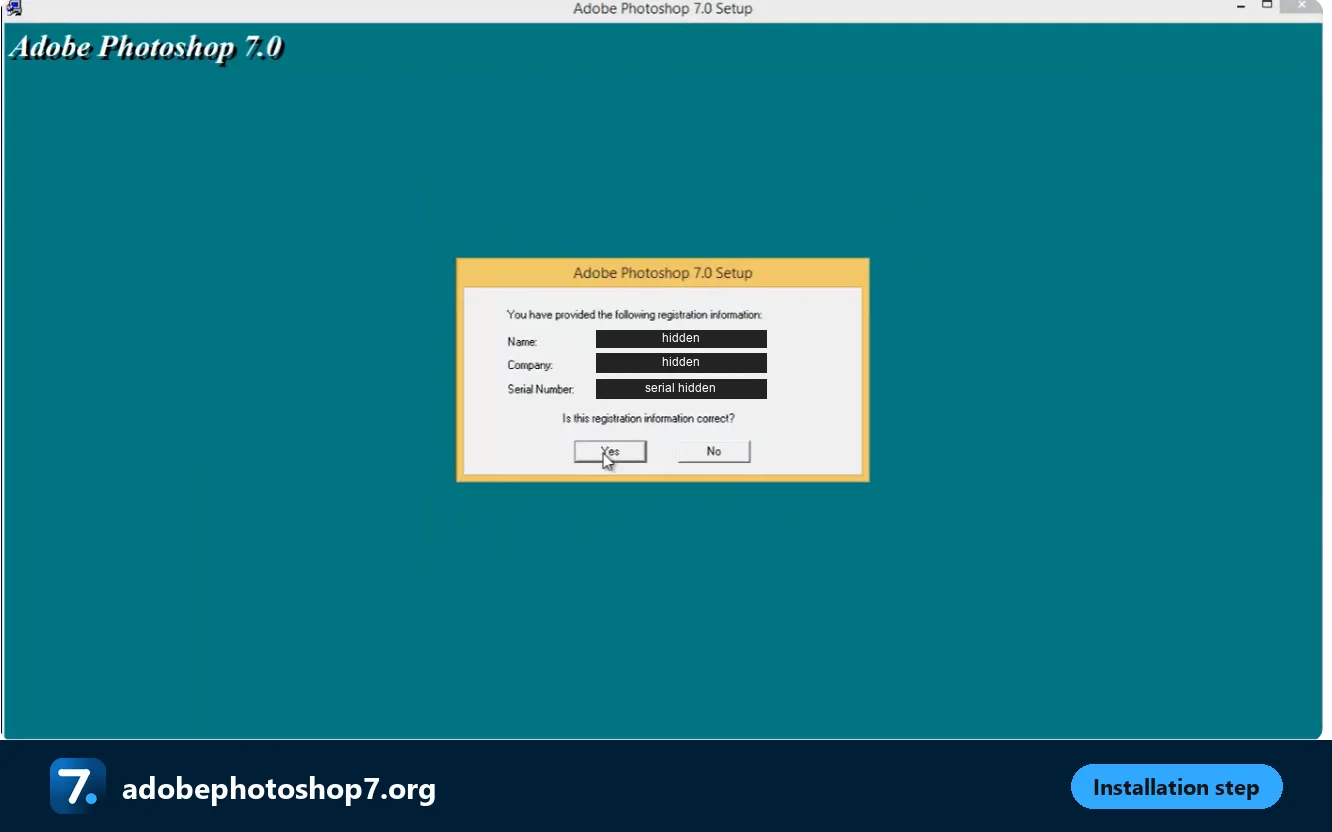
The confirmation screen
The setup program then repeats your name, company and serial number and asks, "Is this registration information correct?" Compare each group of digits with your card. Click No to go back and correct a mistake, or Yes to continue.
In our screenshot, the personal details and number are hidden on purpose. You type your own.
When your genuine serial number is rejected
Most rejections of a genuine number are worth checking for simple mistakes first. Work through this table before you blame the disc.
| Symptom | Possible cause | What to try |
|---|---|---|
| Next does not accept the number | One or more digits typed wrongly | Retype slowly, one box at a time |
| Digits do not appear | Num Lock is off on the keypad | Turn Num Lock on, or use the top number row |
| Number is shorter than 24 digits | It may be a different code or another product | Check the label and find the 7.0 holder |
| Old number fails with the new disc | Upgrade packages use a new number | Use the number inside the upgrade's CD holder |
| Label and disc name different products or systems | Cases got swapped over the years | Match the product, version, language and platform |
| Number from a friend or the internet | It is not your licence | Stop; do not use it |
Typing mistakes
Read the digits aloud in groups of four while someone else types, or place the card under good light and cover the groups you have finished. Worn print can make 3 and 8, or 5 and 6, look alike. Use a magnifying glass rather than guessing many times.
Mixed-up discs and cases
Shops and families often keep several Adobe products in one drawer. Elements, Photoshop LE and full Photoshop are different products. Check that the case holding your number says Photoshop 7.0, and that the disc matches your Windows or Macintosh computer. If you use a Mac, see Photoshop 7.0 on Mac and Android for compatibility limits.
A number that still fails
If you are sure the number, disc and product match, contact Adobe support with your proof of purchase. Do not search for a replacement number online. A rejected genuine number is a support question, and a stranger's number does not answer it.
What to do if your serial number is lost
Contact Adobe with your proof, and be prepared for the answer that it cannot restore support for a product this old. We cannot promise what Adobe will do, and we cannot act for you.
- Gather the invoice, box, disc, registration record and any old Adobe emails.
- Sign in to Adobe's website and check your registered products.
- Open Adobe's support pages and start a chat or case about a legacy serial number.
- Say clearly that the product is Photoshop 7.0 and attach what you have.
- Note the date, the case number and the reply.
- Do not pay any third party who claims to "recover" Adobe serials.
Proof that is worth gathering
- A dated invoice in your name or your business name.
- Photographs of the original disc and packaging.
- The registration card or any confirmation of registration.
- Proof of the earlier version, if yours was an upgrade.
- A written transfer, if the licence came to you from someone else.
If nobody can restore the number
Then treat the installation route as closed. The disc alone is not enough, and a number from elsewhere would not repair the gap in your licence record. Move to a current free or paid editor instead. You will probably gain better support for your computer and newer file formats as well.
Registration and activation: do you need them?
The 7.0 setup asks for your serial number, while registration was a separate step for support and product updates. Adobe community users report that online activation arrived with the later CS versions, not with 7.0.
How registration worked in 2002
The Read Me file offered two routes: post the registration card, or use the online registration software supplied with the program. It said you had to register to receive technical support and important update information.
Those offers belong to 2002. Do not expect an old registration form to work today, and do not treat a failed registration window as a broken licence.
"How do I activate Photoshop 7.0?"
You install it with your own number. There is no activation step on the install screens we show. Be suspicious of any page that offers an "activator" for 7.0, since there is nothing lawful for such a file to do. A genuine licence holder has no need of it.
Windows 7, 10 and 11: does the serial number change?
No, your licence number does not change with your version of Windows. There is no separate "Windows 7 64 bit", "Windows 10" or "Windows 11" serial number for Photoshop 7.0.
The reported requirements list Windows 98, 98SE, Me, NT 4.0, 2000 and XP. Windows 7, 10 and 11 came later, and Windows 10 and 11 are not supported for this program. A page that advertises a special key for a newer system is not describing anything Adobe issued with 7.0.
If setup fails on a newer computer
A setup that will not start, or a program that crashes, is a compatibility problem and not a serial number problem. A different number will not change how an old program behaves on a new system. Our Windows 10 and 11 page explains the options and limits, and the problem fixing page covers common errors.
Moving your licence to a new computer
The agreement counts the computers on which the software is installed. Before moving, uninstall the program from the old machine. Then install on the new one from your own disc, using your own number. Do not leave a second working copy behind on a computer that goes to a relative or a buyer.
Licence basics for Photoshop 7.0 owners
You did not buy the program itself; you received a licence to use it under Adobe's End User Licence Agreement. The setup program displays that agreement and closes if you decline it.
The points below summarise the Photoshop 7.0 agreement published on Adobe's website. Read your own copy, because volume, education and special licences can differ. This is general information, not legal advice.
| Topic | What the agreement says, in short |
|---|---|
| Number of computers | One, unless a valid licence from Adobe says otherwise |
| Backup | One backup copy that is not installed or used on any computer |
| Portable computer | The primary user may make a second copy, not used at the same time as the main one |
| Renting and selling copies | No renting, leasing, sublicensing or repackaging |
| Transfer | Allowed only for all rights together, with conditions |
| Education, pre-release, not-for-resale copies | May not be transferred |
| Businesses | Must document and certify compliance within 30 days if Adobe asks |
One computer means one computer
A single retail licence does not cover the front counter, the editing desk and the owner's home at once. The portable computer allowance is narrow. It belongs to the primary user of the main computer, and the two copies must not be in use at the same time.
The one backup copy
You may keep one backup copy of the software as protection against a damaged disc. It stays on the shelf, not installed. A backup is not a spare to lend to a neighbour, sell at a repair shop or upload to a drive for "friends who lost theirs".
Education copies have extra limits
The agreement says educational software may be used only by someone who qualifies as an educational end user. Such copies cannot be transferred. If you find a second-hand disc marked for education, do not assume you may use it.
Transferring a Photoshop 7.0 licence to another person
A transfer is possible only when the whole licence moves and the old owner keeps nothing. Giving someone the number, or a burnt copy of the disc, is not a transfer.
The agreement sets these conditions:
- all rights go to one person or legal entity;
- the agreement, serial number, software and bundled items go with them;
- all copies, updates and prior versions are included;
- the old owner keeps no copies, including backups and installed copies;
- the receiving person accepts the terms;
- education, pre-release and not-for-resale copies are excluded.
Steps for a clean handover
- Check that the copy is not an education, pre-release or not-for-resale product.
- Collect the discs, box, number, agreement and proof of purchase.
- Include the earlier version if the 7.0 copy is an upgrade.
- Check Adobe's current page on licence transfers and ask support whether any form is needed.
- Uninstall the program from every computer of the old owner and destroy extra copies.
- Write a dated note signed by both parties, listing what was handed over.
- Give the buyer everything and keep only a copy of the signed note.
Buying a second-hand copy
Be careful with listings that offer "key only", "digital delivery" or a handwritten disc. None of these shows a complete transfer. Ask for the original media, the packaging, the purchase proof and a written handover before paying.
Think about value too. Even a clean second-hand licence does not make a 2002 program supported on a modern computer. For many buyers, a free current editor is the more practical choice.
Licences in photo studios, cyber cafés and institutes
A business needs a licence for each computer that runs the program, unless its licence from Adobe allows more. Shared use is where small shops most often go wrong.
| Situation | The safe reading | Action to take |
|---|---|---|
| Three counters, one retail box | One licence does not cover three computers | Run it on one, use other lawful editors elsewhere |
| Staff member installs "his own" copy | The business may still be exposed | Allow only software the business can document |
| Technician formats a PC and adds Photoshop | The source is unknown | Ask for proof or remove it |
| Training institute lab | Each seat needs permission | Get proper licences or teach on free software |
| Customer brings a pen drive with a crack | Unlawful and a malware risk | Refuse to run it |
Keep a simple software register
A register takes one page. List each computer, the programs on it, where the proof is kept and who is responsible. Write only the last few digits of any serial number in the register, and keep the full number in a locked or protected place.
Review the register when you buy, sell, repair or scrap a computer. The Photoshop agreement lets Adobe ask a business to certify its use matches its licences, so records matter.
When staff or owners change
Handover time is when licence proof disappears. Before a partner leaves or a shop changes hands, list every licence and decide in writing who keeps which. Collect discs and boxes from homes and lockers.
Why shared serial numbers and cracks are unlawful
Using a number you have no right to, or software altered to skip the check, means using Photoshop without a licence. It breaks the agreement and can infringe Adobe's copyright.
The agreement does not allow you to modify the software, and it grants use only on its stated terms. A crack changes the program. A keygen produces numbers Adobe did not give you. A "pre-activated" or "portable" package is an altered or unauthorised copy.
A number from a list, GitHub or YouTube
The place where a number appears does not change its status. A code site, a video description, a comment, a forum reply or a text file inside a ZIP are all the same: someone is passing on what is not theirs to give.
So searches for "adobe photoshop 7.0 serial number github" or "serial number youtube" do not lead to a lawful answer. Some public pages are removed later, and others stay up for years. Staying online is not proof of permission.
What about special search codes?
Some people add odd strings such as "94fbr" to a search, hoping to surface pages that list keys. We will not explain or help with that. The result you are after would still be an unlicensed number, and the pages behind such searches are not ones to trust with your computer.
"I only use it at home"
Home use, study and small earnings do not create a licence. The wish to learn is a good one, and free editors serve it without any risk. The skills you build with layers, selections and colour correction carry across programs.
What Indian copyright law says about pirated software
India's Copyright Act, 1957 protects computer programmes, and Section 63B makes the knowing use of an infringing copy of a computer programme on a computer an offence. The section provides for imprisonment and a fine.
Read the current official text for the penalty and any exceptions, since laws are amended. Civil claims by a rights owner are a separate matter from criminal law. If you have received a legal notice or an audit letter, speak to a qualified lawyer instead of relying on a web page.
Why "knowingly" is no safety net
If you typed a number from a website, it is hard to say you did not know it was not yours. Buying a computer with software already installed is different from hunting for a crack, but ignoring doubts is unwise. Ask the seller for proof, and remove what cannot be proved.
Laws outside India
Readers elsewhere have their own copyright laws, and the licence agreement applies as well. Do not assume that something common in your area is lawful there.
Risks of cracks, keygens and "full version" downloads
The danger is not only legal; a cracked package can carry malware that steals what is on your computer. India's Cyber Swachhta Kendra, in an advisory on information-stealing malware, notes that users often download cracked software and so risk infection.
According to that advisory, such malware targets login details, personal identification details and financial information. For a studio, that can mean banking passwords, email accounts and customers' photographs.
Malware inside the package
A crack is a program from an unknown author that you are asked to run, often with full permission. Instructions may tell you to switch off antivirus protection first. That request alone is reason to stop. You cannot check what the file does by looking at its name or size.
Fake download pages and traps
Pages promising a "full version with key" may show several large download buttons, ask you to complete a survey, or push a "download manager". Some give a password-protected archive and send you elsewhere for the password. None of this is needed for software you own on a disc.
| What the page asks | Why it should worry you |
|---|---|
| Turn off antivirus | Removes the protection that might catch malware |
| Run as administrator from an unknown source | Gives the file wide control of the computer |
| Enter your phone number or card details | Your data or money may be the real target |
| Install an extra "helper" first | Adds software you did not ask for |
| Allow browser notifications | Can bring later pop-ups and fake warnings |
Broken or altered program files
Even without malware, a tampered copy can crash, fail to save or behave oddly. You will have nobody to ask for support. Losing a customer's wedding album edit to an unstable copy costs far more than the time saved.
Softonic, torrents, FileCR and other places people search
We do not endorse or link to any download site or torrent for Photoshop 7.0. Searches naming softonic, getintopc, FileCR or similar sites usually hope for an installer with a key attached.
We make no claim about what any particular site hosts today. Our advice is the same for all of them: a copy of Photoshop 7.0 from a third party does not give you a licence.
Torrents and shared drives
With a torrent or a shared drive link, you do not know who built the files or what was added. Many torrent programs also upload to others while you download, which means you may be distributing the copy yourself. Avoid both.
Videos with a link in the description
A video can show a smooth installation and still point to a harmful file. Comments praising it are easy to post. Never copy commands, turn off protection or enter details because a video told you to.
If you already have a cracked or unknown copy
Remove it, check the computer and protect your accounts. You do not need to feel stuck; the steps are manageable.
- Disconnect the computer from the internet if you see strange behaviour.
- Copy your own photos and design files to separate storage, without copying program files or cracks.
- Uninstall Photoshop through the Windows list of installed programs.
- Delete the downloaded installer, crack files and archives.
- Run a full scan with up-to-date security software.
- Change important passwords from another clean device.
- Turn on two-step sign-in for email and banking where offered.
- Install a lawful editor and test it on copies of your files.
When the computer still behaves badly
Pop-ups, unknown programs, changed browser settings or sign-in alerts after removal are warning signs. Ask a trusted technician to examine the machine. A clean reinstallation of the operating system may be the safer course. Tell the technician not to add unlicensed software afterwards.
Protecting customer data
Studios hold identity photos, family pictures and contact numbers. If you suspect that a machine holding them was infected, find out what was stored there. Take advice on whom you need to inform, and keep a note of the steps you took.
Lawful alternatives if you have no licence
You can edit photos lawfully without any Photoshop 7.0 key, using free software or a current Adobe product. Which one fits depends on your work and computer.
| Option | Type | Cost to start | Good for |
|---|---|---|---|
| GIMP | Installed program, free and open source | Free | Layer-based photo editing |
| Krita | Installed program, free and open source | Free | Drawing and painting |
| Photopea | Editor in the browser | Free with advertisements, with paid option | Opening layered files without installing |
| Adobe Express | Adobe's online tool | Free level available | Posters and social posts |
| Photoshop (current) | Adobe subscription | Trial, then paid | Work that needs Photoshop itself |
| Our photo maker | Single-purpose browser tool | Free | Passport and stamp photo prints |
Check each provider's own page for current terms, system requirements and features. We are not affiliated with any of them. Our online and free options page compares them in more detail.
Free editors
Download GIMP from gimp.org and Krita from krita.org, not from a repackaged copy. Photopea runs at photopea.com in a web browser. Test each with one of your usual jobs before deciding.
Check whether your computer is supported first. A very old PC may not run current versions, and a browser editor still needs a modern browser.
Adobe's current Photoshop
Adobe sells today's Photoshop by subscription and offers a free trial, which its India page gives as seven days. Read the trial terms, including payment details and cancellation, before you start. Prices and student offers change, so see Adobe's page for current figures.
A subscription is not a key for Photoshop 7.0. It gives you access to current software under its own terms.
If you only need passport or stamp photos
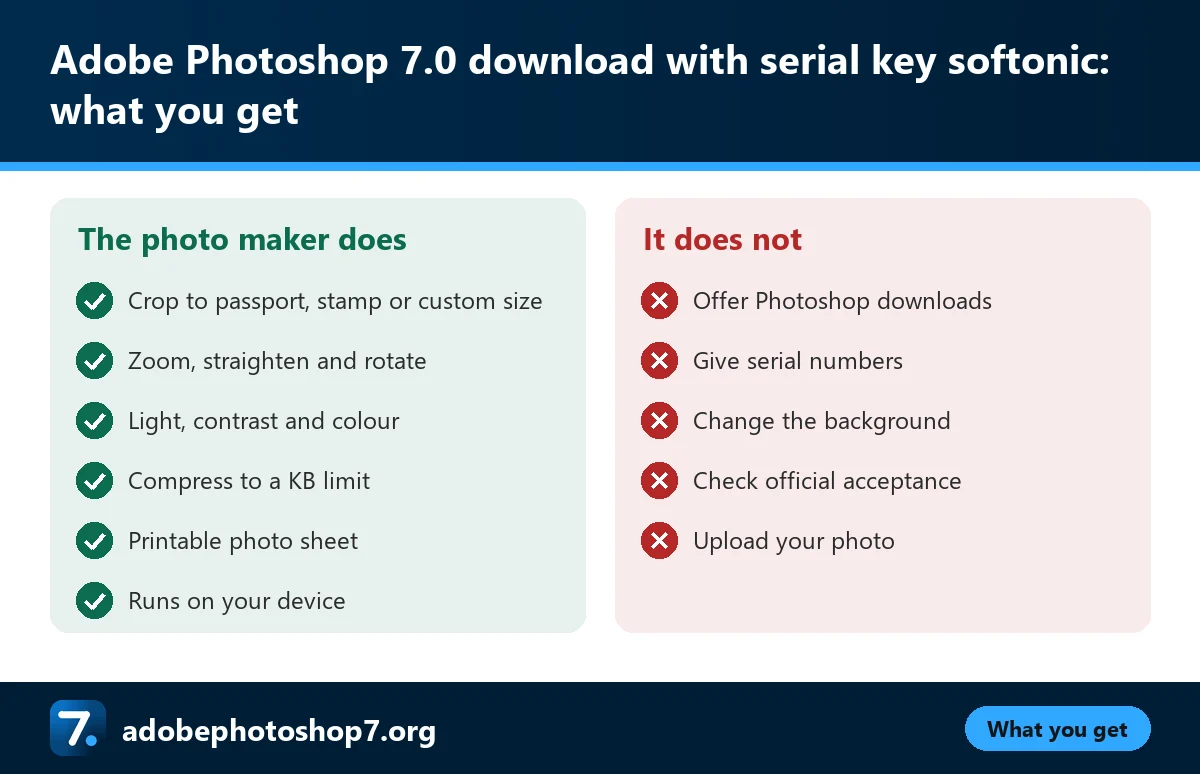
You may not need a full editor at all. Our passport and stamp photo maker opens a JPG, PNG or WebP in your browser without uploading it. You can crop, adjust brightness and contrast, and download a single photo or a print sheet.
It does not change backgrounds, rotate or retouch, and it does not check official acceptance. Confirm the current photo rules with the office that will receive your picture.
Choosing a replacement that fits your work
Pick by the job you do every day, not by the longest feature list. Try the choice on copies of real files before you rely on it.
| Your daily work | First thing to test |
|---|---|
| Passport and ID prints | Exact crop size and print at 100% |
| Wedding album pages | Layers, templates and large file saving |
| Flex banners and cards | Text handling, fonts and print export |
| School or college practice | Whether it runs on the lab computers |
| Occasional family photos | How quickly a beginner can finish one edit |
For students and learners
Learn the ideas that every editor shares: layers, selections, masks, levels, resizing and saving formats. An examiner or employer may ask for a particular program, so check the syllabus. If it names Photoshop 7.0, ask the institute how it provides licensed computers for practice.
For studios and shops
Test colour and print size with your own printer or lab. Keep the old licensed machine for old projects while staff learn the new tool. Do not change software in the middle of a heavy season.
Common myths about the Photoshop 7.0 key
Most myths treat a number as if it were the licence. The table gives the short correction.
| Myth | What is true |
|---|---|
| "It is old, so it is free now" | It is still proprietary software |
| "One universal key works for everybody" | No number is lawful for everybody to use |
| "If a key installs, it must be legal" | An installer accepting digits proves no permission |
| "I own a disc, so any key will do" | You need your own licence and its number |
| "A crack is safe if my friend used it" | You cannot judge safety from another person's luck |
| "Sharing my number helps others" | It breaks your agreement and exposes your licence |
The CS2 download story
You may read that Adobe gave away old Creative Suite software, so Photoshop 7.0 must be free too. Community accounts about replacement downloads concern later CS products for existing owners. They are not a grant of Photoshop 7.0 to the public, and they do not cover a 7.0 key.
"The installer is a trial anyway"
A retail installer that asks for a serial number is not made free by calling it a trial. If you did not receive tryout software from Adobe on its terms, do not treat a downloaded copy as one.
When someone offers you a key or a ready-made installation
Say no politely, and ask what licence stands behind the offer. The offer may come from a helpful relative, a classmate or the person repairing your computer. They may honestly believe that an old program is free to share.
| What you hear | What you can say |
|---|---|
| "I have a number that works" | "Whose licence is it? I need my own." |
| "I will install it free with the repair" | "Please install only what I can show proof for." |
| "Everyone in the market uses it" | "That does not give my shop a licence." |
| "Take my disc and copy it" | "A copy is not a transfer of your licence." |
| "Pay a small fee for a lifetime key" | "Show me the original media and a written handover." |
A payment does not make an offer genuine. A receipt for "software installation" records a service charge, not necessarily a licence. Ask for the product name, the version and the proof of where the licence came from, written on the bill.
If you are a parent or teacher: students often search for a key because a lesson or video used Photoshop 7.0. Help them by offering a lawful tool on the same day. Explain that copying a number is like using another person's ticket, and that unknown downloads can harm the family computer.
Teachers can write lesson tasks by skill, such as "remove a dust spot" or "put a title on a new layer". Students can then practise in whichever permitted editor they have.
Checks before buying a used computer or old disc
Do not count any software in the price unless the seller can hand over its licence. A listing that says "Photoshop loaded" tells you what is on the disk, not what you may use.
Use this list before paying:
- the original Photoshop 7.0 disc and case are present;
- the number is on the seller's printed material, not on a loose slip;
- there is proof of the first purchase;
- an upgrade copy comes with proof of the earlier version;
- the copy is not marked for education or not for resale;
- the seller confirms in writing that all other copies are removed;
- you have a use for such an old program on your computer.
If several points fail, buy the hardware only and ask for the software to be removed. After purchase, a clean installation of a supported operating system also removes whatever the previous user added. Keep your bill, which should describe exactly what you received.
Protecting your work while you change editors
Back up your project files before you uninstall or replace anything. Your photographs and designs are your work, and they should not depend on one old program or one old computer.
- Make a list of the folders that hold PSD files, photos, fonts you bought and templates you made.
- Copy them to an external drive and, if suitable, a second place.
- Open a few copied files to confirm that they are readable.
- Save flat JPG, PNG or TIFF copies of finished jobs while the old program still works lawfully.
- Open sample PSD files in the new editor and compare text, layers and effects.
- Keep the untouched originals until you are satisfied.
Another editor may open a PSD file yet show text or layer effects differently. Check names, dates and amounts on cards and banners before printing again. If you no longer have a lawful way to open a file, try a copy in Photopea or GIMP rather than reinstalling an unlicensed Photoshop.
Tips to keep your licence and serial number safe
These habits cost little and prevent most of the trouble described above.
- Photograph the proof. Take clear pictures of the CD holder, card, discs and invoice, and store them privately.
- Keep a paper copy. Put the number in a sealed envelope with your business documents.
- Never post it. Crop or cover the number before sharing any screenshot of setup or System Info.
- Do not send it by group chat. Messages are forwarded and backed up in places you do not control.
- Label your cases. Write the owner's name and purchase year on the case, not the number.
- Limit who knows it. One responsible person in a shop is enough, with a named backup.
- Uninstall before disposal. Remove the program from any computer you sell, donate or scrap.
- Back up your work separately. Your photos and PSD files matter more than the program and need their own copies.
- Check technicians' work. After a repair, look at what was installed and ask for proof of anything new.
- Watch for fake support. Do not give your number or remote access to an unexpected caller.
Frequently asked questions
What is the serial number of Adobe Photoshop 7.0?
There is no single serial number that everyone may use. The serial number of Adobe Photoshop 7.0 is a 24-digit number supplied with each genuine licensed copy. Owners should check the registration card and the inside cover of the CD holder. We do not publish, generate or share numbers, and we do not link to pages that do.
How can I get a serial number for Adobe Photoshop 7.0?
You can lawfully have one only through a genuine licence: your own original purchase, or a permitted transfer of somebody's complete licence to you. Adobe does not sell Photoshop 7.0 today. If you never owned it, choose a current editor instead. Free programs such as GIMP or Krita need no Adobe number at all.
Is there a free Adobe Photoshop 7.0 serial key?
No lawful free serial key exists for general use. Pages that advertise one are sharing numbers they have no right to share, or are using the offer to get you to download something else. Photoshop 7.0 remains Adobe's proprietary software, even though Adobe no longer sells it. Choose a free editor if your budget is zero.
Can I download Photoshop 7.0 full version with key for Windows 10?
Not from us, and we do not know of a lawful source that bundles Photoshop 7.0 with a key. Adobe does not offer a 7.0 download today and does not support it on Windows 10. If you hold your own disc and number, read our Windows compatibility advice before trying to install on a newer computer.
Is my Photoshop 6.0 serial number valid for 7.0?
No. The Photoshop 7.0 Read Me file says the number used to install earlier versions will not install 7.0. If you bought an upgrade, look inside the upgrade's CD holder for its new 24-digit number. Keep your earlier version's proof too, because an upgrade licence depends on holding a valid licence for the previous version.
How do I register Adobe Photoshop 7.0?
In 2002 you could post the registration card or use the online registration software supplied with the program. Registration was for technical support and update information, and was separate from typing the serial number at setup. Do not expect those 2002 routes to work now. Keep your card and invoice as your own record instead.
Can I use one Photoshop 7.0 serial number on two computers?
Generally the agreement allows one computer unless you hold a volume licence for more. It also lets the primary user make a second copy for exclusive use on a portable computer, provided both are not used at the same time. It does not allow a second person or a second studio counter to use the same single licence.
What should I do if I lost my Photoshop 7.0 serial number?
Search the CD holder, registration card, box, invoices, emails and any computer you installed with your own licence. Then check your Adobe account and contact Adobe support with proof of purchase. Adobe may not be able to help with a product this old. If nothing works, move to a current lawful editor instead of using a stranger's number.
How can I find the serial number from an installed Photoshop 7.0?
Adobe community users report that an installed copy shows it under System Info in the Help menu. Check your own copy, since we cannot promise every installation displays it fully. Use this only on a computer installed with your licence. A number found on a second-hand, shared or repaired computer is not automatically yours.
Is it legal to use Photoshop 7.0 with a crack?
No. A crack alters the program to avoid its licence check, which the agreement does not permit, and using an unlicensed copy can infringe copyright. In India, Section 63B of the Copyright Act deals with knowing use of an infringing computer programme. Cracked files can also carry malware. We do not offer, link to or explain any crack.
How to crack Adobe Photoshop 7.0?
We do not explain how to crack Photoshop or any other software. It is unlawful use, and the files offered for it can put your passwords, money and customers' pictures at risk. If you cannot get a licence, choose GIMP, Krita or Photopea for free work, or Adobe's current Photoshop trial and subscription if you need Adobe's program.
Can I sell or give away my Photoshop 7.0 serial number?
You cannot sell or give away the number on its own. The agreement allows a transfer only of all your rights, together with the agreement, serial number, software and related copies, and you must keep none. The new owner must accept the terms. Education, pre-release and not-for-resale copies cannot be transferred at all.
Do I need a different serial number for Windows 11?
No. A licence number is not issued separately for each Windows version, and Adobe did not make a Windows 11 edition of Photoshop 7.0. The program is not supported on Windows 11, so problems there are about compatibility. A new number from the internet would not fix them and would not be yours to use.
Why does the installer say my serial number is wrong?
Check the digits first, one box at a time, and make sure Num Lock is on if you use the keypad. Then confirm that the number belongs to Photoshop 7.0, not an earlier version or another Adobe product. Upgrade packages carry a new number. If everything matches, contact Adobe with your proof of purchase.
Is a serial number from GitHub or YouTube safe to use?
No. Appearing on a well-known site does not give you permission to use a number, and links shared around such posts may lead to harmful downloads. Adobe's licence goes with the person or business that holds it. Use only the number that came with your own copy, or switch to software you can lawfully use.
Our recommendation for owners and for everyone else
If you hold a genuine licence, find your own proof, store it well and run the program only where the agreement allows. Treat it as an old tool for old needs, preferably on a computer that supports it.
If you have the disc but no number, search the case, card and records, then ask Adobe. If that fails, stop there.
If you never bought Photoshop 7.0, do not look for a key. Try a free editor for practice and everyday jobs, or Adobe's current Photoshop when your work truly needs it. This avoids the legal doubt and the malware risk together.
Questions about this page can go to us through the contact page. We cannot supply numbers, installers or activation files, so please do not send serial numbers to us either.