There is no lawful Adobe Photoshop 7.0 free download, and this website does not host or link any copy of it. Adobe no longer sells or offers version 7.0. If you own an original disc and serial number, you can use those. If you do not, pick a current Adobe plan or a free editor from its official site.
Looking for a free or evaluation version? Adobe does not offer a free or trial copy of Photoshop 7.0 today. You can visit Adobe's official page for its current Photoshop:
Visit Adobe's official Photoshop trial page
This is Adobe's current Photoshop offer, not Photoshop 7.0. Trial availability and terms are set by Adobe.
Other lawful alternatives include:
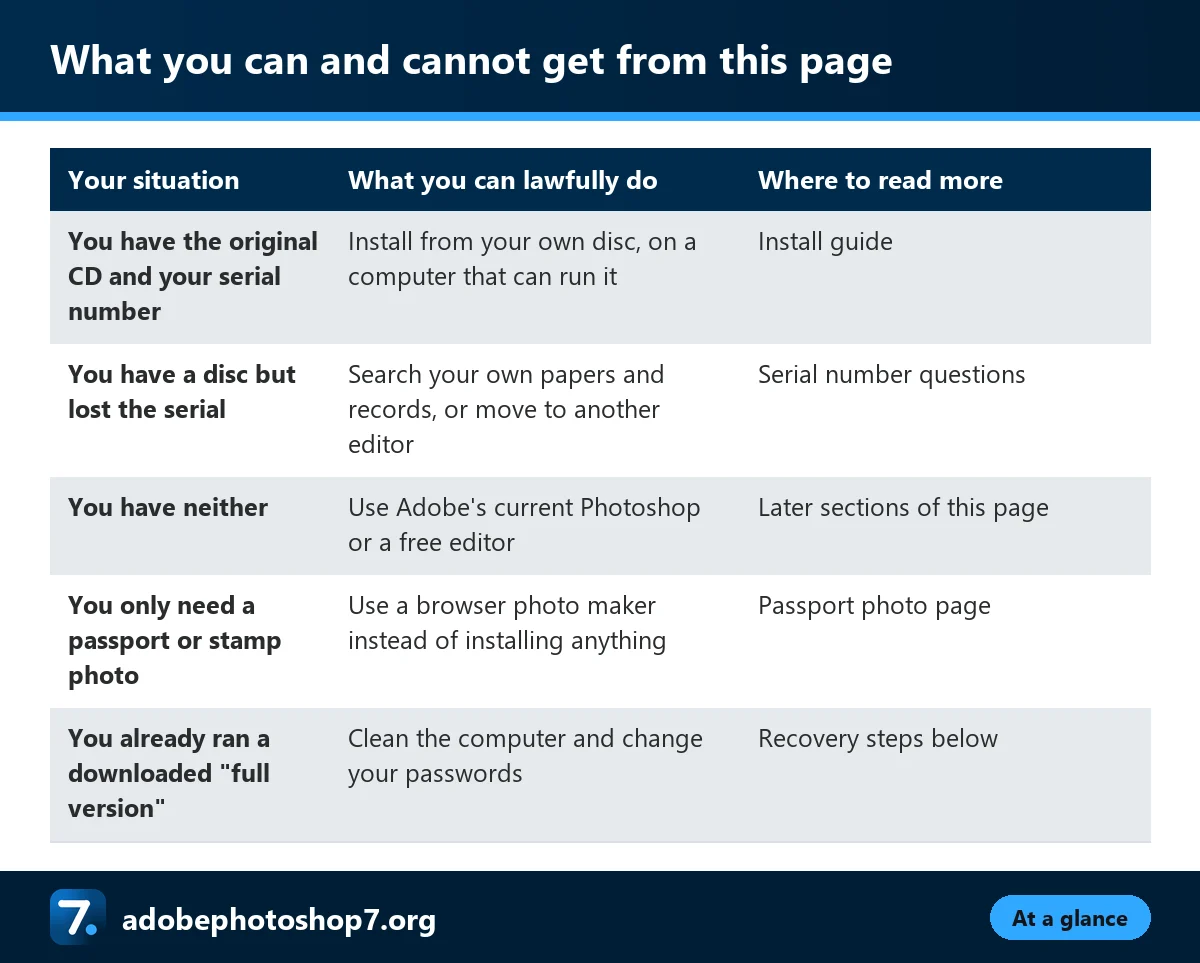
What you can and cannot get from this page
You get information and lawful routes from this page, not an installer. We are an independent website and we are not Adobe. We do not store the program, mirror it, or send you to someone else's copy. We also do not give serial numbers, keys or modified builds.
The short answer by situation
| Your situation | What you can lawfully do | Where to read more |
|---|---|---|
| You have the original CD and your serial number | Install from your own disc, on a computer that can run it | Install guide |
| You have a disc but lost the serial | Search your own papers and records, or move to another editor | Serial number questions |
| You have neither | Use Adobe's current Photoshop or a free editor | Later sections of this page |
| You only need a passport or stamp photo | Use a browser photo maker instead of installing anything | Passport photo page |
| You already ran a downloaded "full version" | Clean the computer and change your passwords | Recovery steps below |
A page that promises a download and then makes you click through five more pages wastes your time. It can also put your computer at risk. You deserve to know in the first minute that the thing you typed into the search box is not on offer here.
Many people type "adobe photoshop 7.0 free download kaise kare" because a teacher, studio owner or cyber cafe taught them on this version. The habit is real and understandable. The old version still does not become free because many people know it.
Adobe Photoshop 7.0 download status in 2026
Adobe does not offer a Photoshop 7.0 download today. The program came out in 2002, for Windows and Macintosh. It was sold as a paid product, mostly on disc, with a serial number.
Adobe released many later versions. It then moved from one-time purchases to Creative Cloud, which is a subscription. The current Photoshop is installed through your Adobe account, and it keeps receiving updates.
Old boxed versions did not come along into that system. The current trial page offers the current Photoshop, not version 7.0.
Why a company stops offering old software
Software makers usually stop distributing very old releases for plain reasons:
- The old installer was built for operating systems that are now out of support.
- Security problems in it are unlikely to be fixed.
- Support staff cannot help with it.
- A newer product replaces it commercially.
These are general reasons. We are not quoting an Adobe statement about version 7.0 in particular. The practical result is what matters to you: there is no official download button for it.
What "discontinued" does not mean
Discontinued does not mean abandoned, public or free. Adobe still owns the program. Copyright lasts far longer than the sales life of a software product.
The word "abandonware" appears on some websites. It is not a legal category that lets you copy software. Treat it as a marketing word.
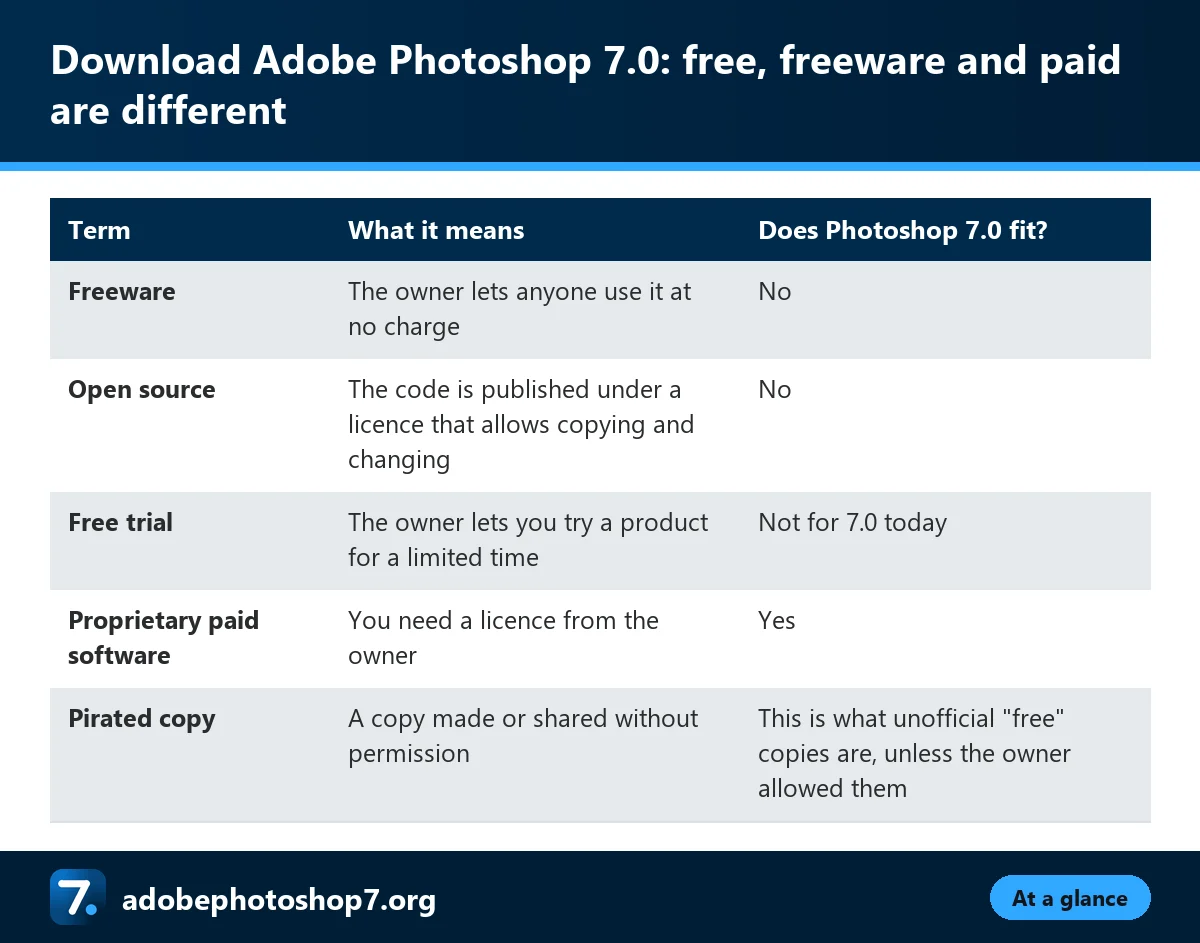
Download Adobe Photoshop 7.0: free, freeware and paid are different
Photoshop 7.0 is proprietary paid software, so the phrase "free full version" does not describe any lawful copy offered by a stranger. It helps to know what the common words mean before you click anything.
| Term | What it means | Does Photoshop 7.0 fit? |
|---|---|---|
| Freeware | The owner lets anyone use it at no charge | No |
| Open source | The code is published under a licence that allows copying and changing | No |
| Free trial | The owner lets you try a product for a limited time | Not for 7.0 today |
| Proprietary paid software | You need a licence from the owner | Yes |
| Pirated copy | A copy made or shared without permission | This is what unofficial "free" copies are, unless the owner allowed them |
When you buy software, you mainly get permission to use it under stated terms. The disc is only the carrier. A file that someone uploads to a sharing site carries no permission with it, even if the file is complete and works.
The law in India
India's Copyright Act, 1957 treats computer programmes as protected works. Section 63B deals specifically with knowingly using an infringing copy of a computer programme on a computer, and makes it an offence. Read the current text on an official government site, or ask a lawyer, if your business has a real question about it.
This matters most for studios, print shops and cyber cafes. You earn money from the computer, and customers sit at it. An unlicensed program there is a business risk, not just a private choice.
Adobe Photoshop 7.0 download for PC from Softonic, GetIntoPC and similar sites
We do not endorse any third-party site as a source of Photoshop 7.0, and we link to none of them. Searches often add a site name, such as softonic, getintopc, get into pc, filehorse, filehippo or softmany. A familiar site name does not give you a licence from Adobe.
A listing may show a logo, a version number, a star rating and a large button. None of these proves that the owner of the software allowed the copy. They also do not prove what is inside the file you receive.
We have not checked what any of those sites offers today. Their pages can change at any time. So we make no claim about a particular file on a particular site. Our point is narrower: a copy of Adobe's paid software from anyone other than an authorised source is not a lawful route.
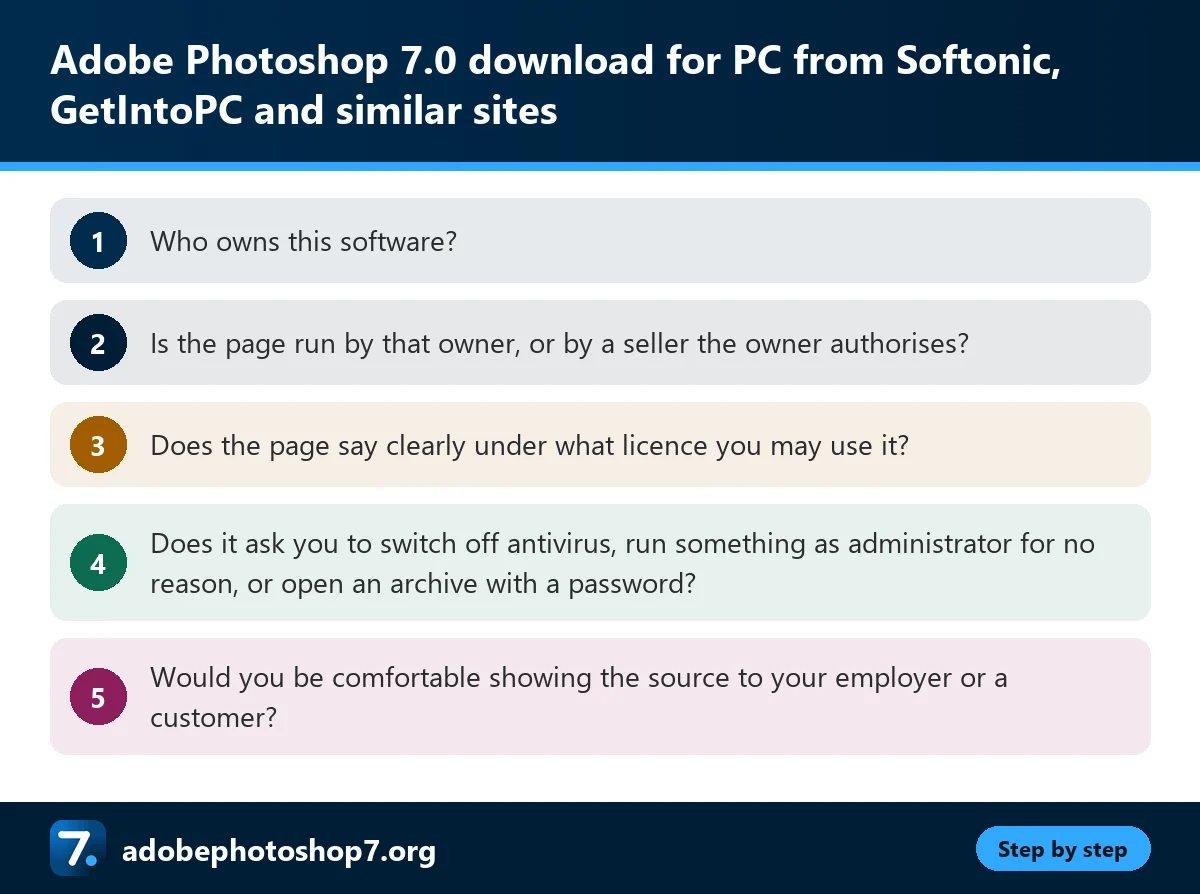
Questions to ask before any download
- Who owns this software?
- Is the page run by that owner, or by a seller the owner authorises?
- Does the page say clearly under what licence you may use it?
- Does it ask you to switch off antivirus, run something as administrator for no reason, or open an archive with a password?
- Would you be comfortable showing the source to your employer or a customer?
If the answer to the second question is no, stop there. The other questions only confirm it.
Adobe Photoshop 7.0 Google Drive links and archive uploads
A Google Drive link or an archive upload is not made safe or lawful by the service that stores it. Storage services hold whatever users put there. People search for "adobe photoshop 7.0 download google drive", "download drive" and similar phrases because a drive link looks personal and ad-free.
You usually cannot tell who made the file, what they added, or whether they replaced it yesterday. The person sharing it can change the contents behind the same message. A comment saying "working 100%" can be written by anyone, including the uploader.
Archive pages and dates.
Some people search for an archive upload by date, for example "adobe photoshop 7.0 internet archive 3 may 2017". An old upload date does not show that the uploader had the right to share the program. It also does not show that the file is clean. We do not link to any such upload.
If a friend sends you a link
Your friend may mean well and still pass on a bad file. Say no politely. Send them an official link to a free editor instead, which helps both of you. You will find those links further down.
Adobe Photoshop 7.0 download 64-bit: what that search gets wrong
There is no official 64-bit edition of Photoshop 7.0. It is a 32-bit era program from 2002. A file that advertises itself as "7.0 64-bit" is therefore not an original Adobe release, whatever its name says.
Page makers know that most new laptops run 64-bit Windows. Adding "64-bit" to a title catches people who check their system type first. The label costs nothing to type.
What 64-bit Windows does with old programs
A 64-bit copy of Windows can run many 32-bit programs. That is not a promise for every program, and it does not make version 7.0 supported. Adobe does not support it on Windows 10 or Windows 11. Our page on Photoshop 7.0 on Windows 10 and 11 explains what to expect when you own a licensed copy.
Adobe Photoshop 7.0 free download for Windows 10 and Windows 11
No free download exists for Windows 10 or 11, and version 7.0 is not supported on either. The requirements reported for it name much older systems. Even a licensed owner should expect possible trouble.
Reported requirements compared
| Item | Reported for Photoshop 7.0 | What it means today |
|---|---|---|
| Windows | 98, 98 SE, Me, NT 4.0 SP6a, 2000 SP2 or later, XP | Windows 10 and 11 are not on the list |
| Processor (Windows) | Pentium III or 4 class | Modern chips are very different |
| Mac | PowerPC G3 or G4, Mac OS 9.1 or later, or OS X 10.1 or later | Current Macs cannot run it |
| Memory | 128 MB minimum, 192 MB recommended | Not a limit on any current laptop |
| Disk space | About 280 MB | Small by today's standards |
| Display | 800 x 600 colour | Old interface may look tiny on sharp screens |
Treat these as reported figures. Your own box or manual is the better reference if you have one.
Mac and phone users.
There is also no Android or iPhone edition of version 7.0. An "app download" for it on a phone is not Adobe's desktop program. See Photoshop 7.0 on Mac and Android for what is actually possible.
If you own an original disc and serial number
If you bought Photoshop 7.0 and still have the disc and your own serial number, use those, within the terms of your licence. This is the one situation where installing version 7.0 makes sense.
Gather these before you start
- The original installation disc.
- The serial number that came with your purchase, usually on the packaging or documents.
- Any receipt, invoice or registration record.
- The licence agreement, printed or shown during setup.
- A computer that the program can realistically run on.
With those in hand, check the disc itself before you put it in a drive:
- Look at the disc under good light for deep scratches and cracks.
- Wipe it gently from the centre outwards with a soft cloth if it is dusty.
- Connect a USB DVD drive if your laptop has no disc slot.
- Open the disc in File Explorer and confirm that the files are listed.
- Create a restore point in Windows before running an old installer.
- Follow the step-by-step instructions in the install guide linked in the table near the top.
Read your licence before copying or moving it.
Licence terms set how many computers you may use and whether you may pass the product to another person. Read yours instead of relying on a forum reply. If you bought a second-hand disc, ask for proof that the licence was transferred properly.
If the disc is dead or the serial is gone
We cannot replace either one, and we will not point you to a copy or a number. You can ask Adobe's support what it can still do for an old registration, but expect limits for a product this old. Otherwise, move your work to a supported editor. Your photos are ordinary files and move with you.
Risks of "adobe photoshop 7.0 free download full version" files
The main risk is that you run an unknown program with full trust on your own computer. An installer asks for permission to change the system. If someone has added something to it, you give that addition the same permission.
What can come bundled
| Possible problem | What you might notice | Why it matters |
|---|---|---|
| Password or data stealer | Often nothing at first | Email, banking and social logins can be taken |
| Ransomware | Files renamed or unreadable, with a payment message | Customer photos and documents can be lost |
| Adware and browser changes | New home page, pop-ups, unknown extensions | Leads you to more bad downloads |
| Unwanted extra programs | New icons you did not ask for | Slows the computer and may collect data |
| Hidden mining software | Fan running hard, slow machine | Wears the computer and wastes power |
| Fake or broken installer | Setup fails or asks for payment | Wasted data and time |
Not every unofficial file contains these. The trouble is that you cannot know from the outside.
Warning signs on the page
- Several "Download" buttons that go to different places.
- A countdown, then another page, then another button.
- A request to allow browser notifications.
- Instructions to turn off Windows Security first.
- A password-protected archive, which scanners cannot look inside until it is opened.
- A promise of "no installation", "lifetime" or a special unlocked build.
Warning: Never switch off your antivirus because a download page or a text file told you to. That instruction is one of the clearest signs that you should delete the file.
The stakes are higher for a studio or cyber cafe. A shared computer holds other people's identity photos, scanned documents and sometimes logins. One bad installer can expose all of them. You may also lose a day's work while someone cleans the machine.
How to check a downloaded file without running it
Scan the file, look at its name and signature, and delete it if anything is wrong. A clean scan lowers one kind of risk. It does not make the copy lawful, and it cannot prove the file is safe.
Scan with Microsoft Defender
- Do not double-click the file.
- Open the folder where it was saved.
- Right-click the file. On Windows 11, choose Show more options.
- Select Scan with Microsoft Defender.
- Read the result on the Scan options page that opens.
- If a threat is reported, let Windows Security remove or quarantine it.
If you use another antivirus product, use its own right-click scan or its custom scan.
Look at the file name and type
Turn on file name extensions in File Explorer. In Windows 10 this is under the View tab. In Windows 11 it is under View, then Show.
A name like "photo-editor.pdf.exe" is a program pretending to be a document. Endings such as .exe, .msi, .scr, .bat, .cmd, .js and .vbs can all run code. A very small file claiming to be a complete design program is another bad sign.
Check the digital signature
Right-click a program file, open Properties, and look for a Digital Signatures tab. No tab means the file is not signed in that way. A signature from an unrelated name is also a warning. Very old software may be unsigned, so this test alone does not settle anything.
Suppose the scan is clean, the name looks normal and a signature is present. Delete the file anyway if you did not get it from the owner or an authorised seller. The licence problem remains after any scan. Keep your effort for software you are allowed to use.
How to recover after running a bad file
Disconnect from the internet first, then scan, uninstall, and change passwords from a clean device. Act the same day. Do not wait for the computer to start behaving strangely.
Step 1: cut off and scan
- Turn off Wi-Fi or pull out the network cable.
- Unplug external drives and pen drives, and keep them aside for scanning.
- Open Windows Security, then Virus & threat protection.
- Run a full scan from Scan options.
- Then choose Microsoft Defender Offline scan and let the computer restart.
- Check Protection history for what was found.
An offline scan works outside the normal Windows session, which helps against threats that hide while Windows is running. If the virus definitions are old, you may need a brief connection to update them before scanning.
Step 2: uninstall what arrived with it
- Open Settings, then Apps. Windows 11 calls the list Installed apps.
- Sort by install date.
- Uninstall the suspect program and anything else installed on the same day that you do not recognise.
- Open each browser and remove unknown extensions.
- Reset the home page and search engine if they changed.
- Delete the downloaded file and empty the Recycle Bin.
Do not uninstall drivers or Microsoft components just because the name is unfamiliar. Look the name up on another device first.
Step 3: change passwords from a clean device
Use a phone or another computer that never ran the file. Change your main email password first, because other accounts reset through it. Then change banking, UPI-linked, social media, shopping and cloud storage passwords. Use a different password for each.
Sign out other sessions in each account's security settings, and turn on two-step verification. Check recovery email addresses and phone numbers for ones you did not add.
Step 4: watch money and report fraud
Check bank and wallet statements. If you see a payment you did not make, contact your bank at once. In India, you can call the cyber crime helpline 1930 for financial fraud and file a complaint on the National Cyber Crime Reporting Portal at cybercrime.gov.in.
When to reset the computer
Consider a clean reinstall of Windows if threats keep returning, security tools will not open, or files were encrypted. Copy only your documents and photos, never programs or installers. A trusted repair person can do this if you are unsure.
Your legal options after "adobe photoshop 7.0 download"
You have two honest routes: Adobe's current Photoshop on a trial or paid plan, or a free editor taken from its official site. Both give you a program that runs on a modern computer.
| Option | Runs on | Cost model | Official address |
|---|---|---|---|
| Adobe Photoshop (current) | Windows, macOS, iPad | Trial, then paid subscription | adobe.com |
| GIMP | Windows, macOS, Linux | Free, open source | gimp.org |
| Photopea | Web browser | Free to use online | photopea.com |
| Krita | Windows, macOS, Linux, Android | Free from krita.org; paid store editions exist | krita.org |
| Paint.NET | Windows | Free download; Microsoft Store edition is paid | paint.net |
Details can change, so confirm them on each official site.
Pick Adobe if your job or client requires Photoshop itself. Pick GIMP for general photo editing with layers. Pick Photopea when you cannot install anything. Pick Krita for drawing and painting. Pick Paint.NET for light edits on a recent Windows computer.
Adobe's current Photoshop trial and plans
Adobe offers a seven-day free trial of the current Photoshop, and it becomes a paid subscription unless you cancel. This is the official way to try Photoshop without paying first. It is not a way to get version 7.0.
Adobe's India trial page, checked in November 2026, states the following:
- The trial starts at checkout and lasts seven days.
- It converts automatically to a paid Creative Cloud subscription afterwards.
- Only one seven-day Photoshop trial is available per person.
- There is a refund window if you cancel within 14 days.
- Students are not given Photoshop free there, though a student discount is described.
We do not list prices because they change. Read the figure, the billing period and the cancellation terms on the checkout screen.
A safe way to use the trial
- Type the Adobe address yourself or use the link in our sources.
- Check the current system requirements against your computer.
- Read the plan, billing period and cancellation terms.
- Note the end date in your phone with a reminder two days earlier.
- Test your real tasks during the week, such as your usual print job.
- Cancel from your account if you do not want to pay.
Moving from 7.0 habits to the current version
The newer program looks different and has far more panels. Many core ideas are the same: layers, selections, the Crop tool and adjustment commands. Allow yourself a few sessions before judging it.
GIMP as a free replacement
GIMP is a free, open-source image editor with layers, selections, text, filters and colour tools. At the time of checking, the official downloads page listed version 3.2.8 as the current stable release. It listed Windows 10 version 1903 or newer for the installer, and macOS 11 or newer.
Get it safely
- Go to gimp.org and open the Downloads page.
- Choose your operating system.
- Download the installer from that page, or use the Microsoft Store listing it points to.
- Compare the SHA256 value if you want to confirm the file arrived intact.
- Run the installer.
The GIMP page also warns that it publishes no package on the Apple App Store.
Expect a short period of adjustment. Tool names are familiar, but their places and shortcut keys differ in many cases. Saving uses GIMP's own XCF format, while JPG and PNG come out through Export. GIMP can open PSD files, though some layer effects may not survive exactly. Keep your original PSD untouched.
Photopea in the browser
Photopea is an image editor that runs in a web browser, with nothing to install. Its site says it opens and saves PSD files and processes your files on your own device. For people searching "adobe photoshop 7.0 online free download", this is usually closer to the need than a download.
It suits a locked-down office computer, a low-storage laptop or a quick job on someone else's machine. The layout will look familiar to Photoshop users. It is made by a different developer and is not an Adobe product.
Where to be careful
The free version carries advertising, according to published reviews. Type the address yourself so you do not land on a copycat page. On a shared computer, close the tab and delete saved customer files when you finish. Our page on online and free options covers browser editing in more detail.
Krita and Paint.NET
Krita and Paint.NET are free options with narrower strengths than GIMP or Photoshop. Choose them for what they are good at.
Krita for drawing and painting
Krita is open-source software aimed at digital painting and illustration. Its download page lists Windows 8.1 or higher, macOS 10.15 or higher, Linux and Android, and says iPads and iPhones are not supported. New versions do not support 32-bit Windows. Paid editions on some app stores support development, while the website download costs nothing.
Paint.NET for simple Windows edits
Paint.NET is a Windows editor for everyday tasks. Its documentation asks for Windows 11 or Windows 10 version 21H2 or newer, a 64-bit processor, and recommends an SSD. The download page marks the Microsoft Store edition as paid and the dotPDN download as free. It will not run on an old XP-era computer.
Here is how the four free options line up for common jobs.
| Job | GIMP | Photopea | Krita | Paint.NET |
|---|---|---|---|---|
| Crop and resize a photo | Good fit | Good fit | Possible | Good fit |
| Work with a PSD from a client | Possible | Good fit | Possible | Check before relying on it |
| Digital painting | Possible | Basic | Good fit | Basic |
| No installation | No | Yes | No | No |
This table is a general guide, not a test result. Try your own file before you promise a customer anything.
How to download Adobe Photoshop 7.0 in a laptop: the questions behind it
You cannot lawfully download it today, so the useful question is what you want the laptop to do. Match the job to a route and you will finish sooner.
Passport, visa and stamp photos
You do not need a large editor for sizing a portrait. Our free passport and stamp photo maker opens a JPG, PNG or WebP in your browser without uploading it. It sizes the photo, adjusts brightness and contrast, and makes a print sheet. It does not change backgrounds, retouch, or check official acceptance.
Changing a photo background
Searches for background changes often include "download", in Hindi, Bengali or English. The technique matters more than the version. If you have a licensed copy of 7.0, see removing a background in Photoshop 7.0. Otherwise, GIMP and Photopea both have selection tools for the same job.
College and course work
Ask your teacher which skills are being marked, not only which version is on the lab computer. Layers, selections and colour correction transfer between editors. If you practise on a lab machine, our Photoshop 7.0 learning path gives you an order to study in.
How search results for "free download adobe photoshop 7.0" can mislead
Search results are ranked pages, not approved sources, so a high position proves nothing about permission or safety. Learning to read a results page protects you for every program, not only this one.
Paid placements usually carry a small "Sponsored" or "Ad" label. They sit where your eye lands first. Anyone who pays and passes the platform's checks can appear there, so read the web address before you click.
Addresses that imitate
A web address can contain a famous name without belonging to that company. What counts is the main domain just before the first single slash. In "adobe.example-files.com/photoshop", the site is example-files.com, which is not Adobe. Hyphenated names with words like "free", "full" or "download" deserve the same doubt.
Videos and comments.
Many tutorial videos place a link in the description. The video may show a real program working while the link delivers something else. Comments praising the file are easy to fake. Learn the editing skill from a video if you like, and ignore its download link.
Pages that copy our wording.
A page can say "safe", "official", "virus free" or "verified" with no one checking it. Those are claims by the page about itself. Look for evidence outside the page: the owner's own domain, a known app store listing, or a published checksum on the project's site.
Messages and pop-ups that follow a download search
Treat any sudden warning, prize or support number that appears during a download search as suspect. These tricks rely on hurry.
Take the fake virus alert first. A web page cannot scan your computer just because you visited it. A flashing alert with a phone number is advertising or fraud. Close the tab. If it will not close, end the browser from Task Manager and do not restore the old tabs.
Fake "codec" or "downloader" tools
Some pages say you must first install their downloader, media player or driver. A normal program installer does not need a stranger's helper tool. Cancel and leave.
Callers offering to fix it
Do not give remote access to someone who contacts you unexpectedly. Do not share a one-time password, UPI PIN or card number with a caller who claims to be from Adobe, Microsoft, your bank or the police. Hang up and contact the organisation through its own published number.
| What you see | What to do | What not to do |
|---|---|---|
| "Your PC is infected" page with a number | Close the browser | Do not call the number |
| Browser asks to show notifications | Choose Block | Do not click Allow to "continue" |
| Page asks for card details to "verify" a free file | Leave the site | Do not enter any details |
| Caller asks you to install a remote tool | End the call | Do not read out any code |
| Archive asks you to disable antivirus | Delete it | Do not extract or run it |
Cleaning your browser after visiting download sites
Check extensions, notifications, home page and saved downloads, even if you never ran a file. Some changes happen through the browser alone.
Start with notification permissions, because they can keep showing misleading alerts after the tab is closed:
- Open your browser's settings.
- Search the settings for "notifications".
- Look at the list of sites allowed to send them.
- Remove every site you do not know and trust.
- Close and reopen the browser.
Review extensions.
Open the extensions page and read each name. Remove anything you did not choose, or no longer use. If an extension returns after removal, a program on the computer may be adding it back, so run a full scan.
Clear the Downloads folder.
Sort the folder by date. Delete installers and archives you cannot account for. Do this before another family member double-clicks one out of curiosity.
Protecting your photos before you try any new editor
Back up your pictures and project files first, because no change to software is worth losing originals. This applies to trials and free tools too.
A simple routine is enough for a home user or a small studio:
- Make one folder for each customer, event or project.
- Copy the folders to an external drive.
- Keep a second copy elsewhere, such as another drive or a cloud account you control.
- Open a few files from the backup to confirm they work.
- Disconnect the backup drive when the copy ends.
A drive that stays plugged in can be hit by the same ransomware as the computer. Disconnecting it is the cheap protection.
Keep originals and working copies apart
Save the camera file untouched. Edit a copy. Keep the layered file, and export a JPG for printing or upload. When you switch editors, this habit means a format problem never costs you the source.
Check old PSD files in a new editor.
Open a copy of an important PSD and look at text layers, layer styles, masks and colours. Text may use a font you no longer have. Note differences before you send the file to a printer.
Switching a photo studio or cyber cafe to lawful software
Move one computer and one common job at a time, so work does not stop. A studio that has used an old version for years can still change without a bad week.
Write down the jobs from an ordinary week: passport prints, background changes, album pages, flex banners, wedding retouching, form photo resizing. Mark which ones must open a client's PSD. This list decides the tool, not habit or brand.
Run a small trial
- Choose one computer that is not needed all day.
- Back it up and remove software you cannot show a licence for.
- Install the chosen editor from its official source.
- Repeat five real jobs with copies of old files.
- Time them and note what is missing.
- Write a one-page instruction sheet for staff.
- Move the next computer only after those jobs go smoothly.
Keep proof of what you installed
Keep a small register: computer name, program, version, source, licence type and date. Save invoices and subscription emails. For free software, note the official address you used. The register helps when a computer is repaired or a staff member leaves.
Handle customer pictures with care.
Identity photos are personal. Delete them from shared computers when the job is complete, or keep them in a locked account if the customer wants reprints. Do not sign in to your personal email on a counter machine that others use.
What students and home users can do with no budget
A free editor plus steady practice covers most learning and home tasks. You do not need version 7.0 to learn how image editing works.
These skills carry across editors, so learn them in whichever one you have:
- Reading image size in pixels and print size in millimetres.
- Cropping to a fixed shape.
- Using layers instead of painting on the original.
- Making a clean selection and softening its edge.
- Correcting brightness and colour a little at a time.
- Exporting JPG for photos and PNG for graphics that need transparency.
A four-week practice plan
| Week | Practise | Finished result |
|---|---|---|
| 1 | Open, crop, resize, save copies | A set of correctly sized photos |
| 2 | Layers, text and alignment | A simple notice or invitation |
| 3 | Selections and masks | A subject placed on a plain colour |
| 4 | Colour correction and export | Before and after versions for print and screen |
The weeks are only a suggestion. Move faster or slower as you like.
When your syllabus names Photoshop 7.0
A course outline may still name this version. Use the institute's licensed computer for version-specific practice, and a free tool at home for general skills. Ask the institute politely what licence it holds if you are asked to copy its installer. A copy on your pen drive is not covered just because you are a student there.
Spotting a counterfeit or second-hand disc
A disc sold today is lawful only if it is genuine and the licence comes with it. Sellers of copies often make them look convincing.
Stop and think again if you notice any of these signs:
- A hand-written or home-printed label.
- Many programs from different companies on one disc.
- A serial number written on the sleeve by the seller, or offered by message.
- No box, documents or purchase history, with a very low asking price.
- A seller who says "everyone uses it" when you ask for proof.
Ask before paying
Ask whether the original licence was transferred, for what product and version, and what papers come with it. If the seller cannot answer, walk away. A genuine antique disc may also fail to install on your computer, so you could pay for something you cannot use.
Upgrade discs.
Some boxed software was sold as an upgrade from an earlier version. An upgrade copy depends on holding the qualifying earlier licence. Read the packaging and the agreement closely before assuming it stands alone.
Why "portable" and "pre-installed" copies are not a shortcut
A "portable" or ready-made build is a modified copy that Adobe did not hand you, so we neither explain nor recommend it. Skipping the installer does not skip the licence.
Someone had to alter or repackage the files. You cannot see what else they did. Running it from a pen drive does not stop it from reading your files or starting other programs.
Computers sold with software already inside
A used or assembled computer may arrive with expensive programs already installed. Ask the seller for the disc, serial and invoice that belong to you. If none exist, uninstall the program and choose a lawful editor. This is common sense for a studio buying a second-hand machine.
A lawful download checklist you can reuse
Check the source, the licence and the file before you run any installer. The same list works for editors, printer drivers and PDF tools.
Run through these points before downloading anything:
- Type the maker's address yourself or use a bookmark.
- Confirm the licence or price on that site.
- Check that your operating system is supported.
- Make sure there is a recent backup.
Before installing.
- Check the file name and extension.
- Scan the file.
- Compare the published checksum when the project provides one.
- Read each setup screen and untick extras you do not want.
How to compare a checksum
- Copy the SHA256 value from the project's official download page.
- Open PowerShell on your computer.
- Type Get-FileHash, a space, then drag the downloaded file into the window.
- Press Enter and wait.
- Compare the Hash value with the published one. Capital or small letters do not matter.
If they differ, delete the file and download again from the official page. A match shows the file is the one the project published. It says nothing about a file from some other site whose own page prints its own value.
Tips for avoiding fake Photoshop downloads
These ten habits cut your risk without needing technical skill.
- Start from the maker's own website, not from a search advert.
- Be suspicious of any paid program offered as "free full version".
- Do not install anything that asks you to switch off protection first.
- Keep Windows and your browser updated.
- Use a standard Windows account for daily work, and an administrator account only when needed.
- Show file extensions, so a disguised program is easier to see.
- Keep one backup drive unplugged except during copying.
- Use a different password for your email than for everything else.
- Teach staff and family to ask before installing anything.
- If a deal needs secrecy, a password-protected archive and a hurry, drop it.
For shared computers, add one written rule. Post a short notice near the screen: no software installation without the owner's permission. It is easier to refuse a customer politely when the rule is written down.
Reporting a problem with this page
Write to us at [email protected] if something here is wrong or out of date. Official sites change their terms and requirements, and we would like to correct stale details.
Name the section, say what you saw on the official page, and add its address. Please do not send serial numbers, passwords or copies of software. We cannot use them and will not forward them.
What we cannot do
We cannot activate, repair or replace a licence, and we cannot send an installer to anyone. For account and billing matters, contact the company that sold you the product. For faults in a licensed installation, our page on fixing Photoshop 7.0 problems may help.
Frequently asked questions
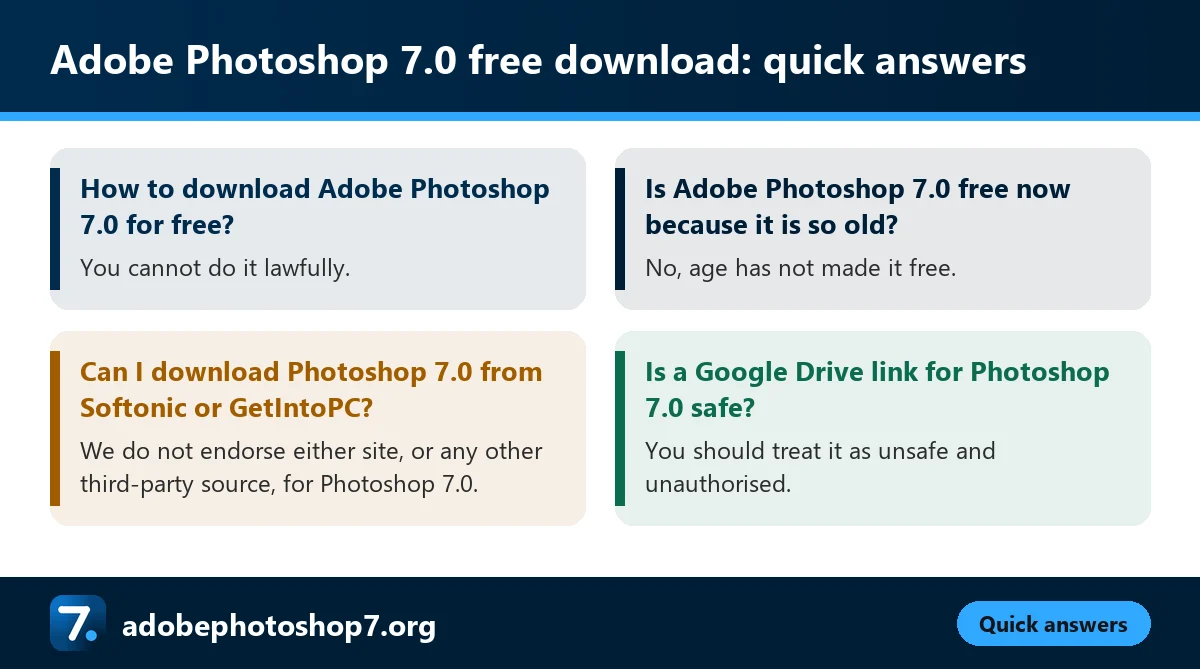
How to download Adobe Photoshop 7.0 for free?
You cannot do it lawfully. Photoshop 7.0 is paid software owned by Adobe, and Adobe no longer offers it. We do not host or link a copy. If you want to edit pictures without paying, download GIMP or Krita from their own websites, or open Photopea in your browser. If you specifically need Photoshop, Adobe offers a short trial of the current version.
Is Adobe Photoshop 7.0 free now because it is so old?
No, age has not made it free. We know of no Adobe release of version 7.0 as freeware or open source. Stopping sales does not end the owner's copyright. A website calling it free is describing its own price, not permission from Adobe. You still need a genuine licence of your own to install and use it.
Can I download Photoshop 7.0 from Softonic or GetIntoPC?
We do not endorse either site, or any other third-party source, for Photoshop 7.0. We have not checked what they offer today, so we make no claim about a particular file. A well-known site name does not give you Adobe's licence. Use your original disc if you own one, or pick a supported editor from its maker.
Is a Google Drive link for Photoshop 7.0 safe?
You should treat it as unsafe and unauthorised. A shared drive file can be uploaded or replaced by its owner, and you usually cannot tell who prepared it. The storage service being well known does not vouch for the contents. Adobe does not distribute version 7.0 to the public through shared drive links, so do not run such a file.
Is there a 64-bit version of Adobe Photoshop 7.0?
No, Adobe did not make a 64-bit edition of version 7.0. It dates from 2002 and is a 32-bit era program. A download advertised as "7.0 64-bit" is not an original release under that name. If you need a native 64-bit editor, current Photoshop, GIMP, Krita and Paint.NET are the places to look.
Can I use Photoshop 7.0 on Windows 10 or Windows 11?
Adobe does not support it there. Owners of a genuine copy sometimes get it running, but results vary between computers and nothing is guaranteed. You may meet installer errors, display scaling trouble or problems with newer file formats. Use only your own disc and serial, make a restore point first, and keep a supported editor available for important work.
I own the disc but lost my serial number. What can I do?
Look through the box, manuals, invoices, old emails and any registration record in your name. You may ask Adobe support whether anything can be traced, though help for software this old is limited. We cannot supply a number, and you should not use one from the internet. If you find nothing, move your work to another editor.
I already ran a downloaded full version. What should I do first?
Disconnect the computer from the internet. Then run a full scan and a Microsoft Defender Offline scan, and uninstall unfamiliar programs added that day. From a different, clean device, change your email password first, followed by banking and social accounts. If money is missing, call your bank immediately and report the fraud on 1930 or cybercrime.gov.in.
Does a clean antivirus scan mean the file is fine to use?
No. A scan only tells you that the tool did not recognise a threat at that moment. New or well-hidden code can pass. A scan also says nothing about permission: an unauthorised copy stays unauthorised after a clean result. Delete installers that did not come from the owner or an authorised seller, however the scan turns out.
Can I download Photoshop 7.0 filters or plug-ins?
Only take plug-ins from their own developer, under a licence you accept. Photoshop 7.0 includes built-in filters under the Filter menu, so check those first if you have a licensed copy. Many free "filter packs" come from unknown uploaders and may contain programs. Also confirm that a plug-in states support for your version before installing it.
Is there a Photoshop 7.0 app for Android or iPhone?
No, version 7.0 is a desktop program for Windows and Macintosh computers. An app or APK using that name is not the original Adobe release. Installing an APK from an unknown site can expose your messages, photos and accounts. Use your phone's official app store and check the developer's name before installing any photo editor.
Which free editor feels closest to Photoshop 7.0?
Photopea and GIMP are the usual choices. Photopea runs in a browser and has a layout that Photoshop users recognise quickly. GIMP is installed on your computer and works without a browser, though several menus and shortcuts differ. Try one familiar job in each, such as cropping and background removal, and keep whichever you manage better.
Can I install my licensed copy from a downloaded file if my disc is broken?
Do not fetch a replacement from a download site. Your licence does not turn a stranger's upload into your disc, and you cannot know what was changed in it. Ask Adobe support what is possible for your registration, and read your licence about backup copies. If there is no official answer, use a supported editor instead.
Does Adobe's free trial give me Photoshop 7.0?
No, the trial is for the current Photoshop. Adobe's India page describes a seven-day trial that turns into a paid subscription unless you cancel, with one trial per person. Check the system requirements and the billing terms before you start, because they can change. Save your work in formats you can open elsewhere if you may cancel.
Can a cyber cafe use one Photoshop 7.0 copy on every computer?
Not unless its licence clearly allows that, and you should not assume it does. Software licences normally limit the number of computers or users. Read the agreement that came with your purchase. If you cannot cover every machine, remove the extra installations and use free editors there, keeping a record of what each computer has.
Why does this website not provide the download if people want it?
We have no right to distribute Adobe's software, so we do not. Hosting or linking a copy would also expose readers to files we cannot control. This site explains how to use, install from your own disc and troubleshoot, and it points to lawful alternatives. It is independent and is not run or approved by Adobe.
Our recommendation for anyone searching for Photoshop 7.0
Do not download Photoshop 7.0 from an unofficial source; use your own licence or choose a supported editor. That is the advice we would give a friend asking the same question.
If you have the licence
Install it only from your original disc, keep that computer backed up, and expect limits on new Windows versions. Consider keeping a supported editor beside it for files and formats the old program cannot handle.
If you do not have the licence
Try GIMP or Photopea first if cost is the main concern. Take Adobe's trial if your work specifically needs current Photoshop, and decide before the seven days end. Pick Krita for painting, or Paint.NET for light Windows edits.
If you already installed a copy of unknown origin
Remove it, scan the computer, and follow the recovery steps above if you ran anything alongside it. Your photos can stay. The program should not.