There is no Adobe Photoshop 7.0 for Android, and there never was one. Adobe released version 7.0 in 2002 for Windows and Macintosh computers only. Any "Photoshop 7 APK" is not Adobe's Photoshop 7. On a phone, use a current official app. Modern Macs cannot run the old Mac version directly either.
Is there an Adobe Photoshop 7.0 for Android?
No, Adobe Photoshop 7.0 for Android does not exist in any form. The program is older than Android phones, which reached shops only some years after 2002. It was written for desktop processors, desktop operating systems, a mouse and a keyboard.
Moving a desktop program to a phone means rebuilding it. The interface, the way it reads files, and the code for the processor all have to change. Adobe did not do this for version 7.0. Adobe's mobile apps are separate, much newer products with their own names, screens and tools.
Why an old desktop program cannot become an APK
An APK is the package file that Android uses to install an app. Android's developer documentation describes it as an archive holding what the app needs to run. Renaming a Windows installer to end in .apk does not create such a package. The phone either rejects it or, worse, installs something unrelated that somebody else built.
Photoshop 7.0 on Windows expects Windows system files. The Mac edition expects Mac OS system files. Android provides neither. No setting, file manager or "installer helper" app changes that.
Pages that promise an Android download of version 7.0 tend to offer one of a few things:
- A different photo editor with a Photoshop-like name or icon.
- A tutorial app or PDF reader about Photoshop, not an editor.
- An old Windows setup file inside a ZIP, which a phone cannot run.
- A "mod APK" of some other app, changed by an unknown person.
- An advertising page that asks you to install several apps before the "real" file.
None of these gives you Photoshop 7.0. Some may harm your phone or your data.
You do not need to trust this page alone. Look at the requirements printed for version 7.0: Windows or Mac OS, with a desktop processor. Android is not on the list. Then look at Adobe's own mobile pages. They offer Photoshop on mobile, Photoshop Express and Lightroom. They do not offer version 7.0.
Which devices can actually run Photoshop 7.0?
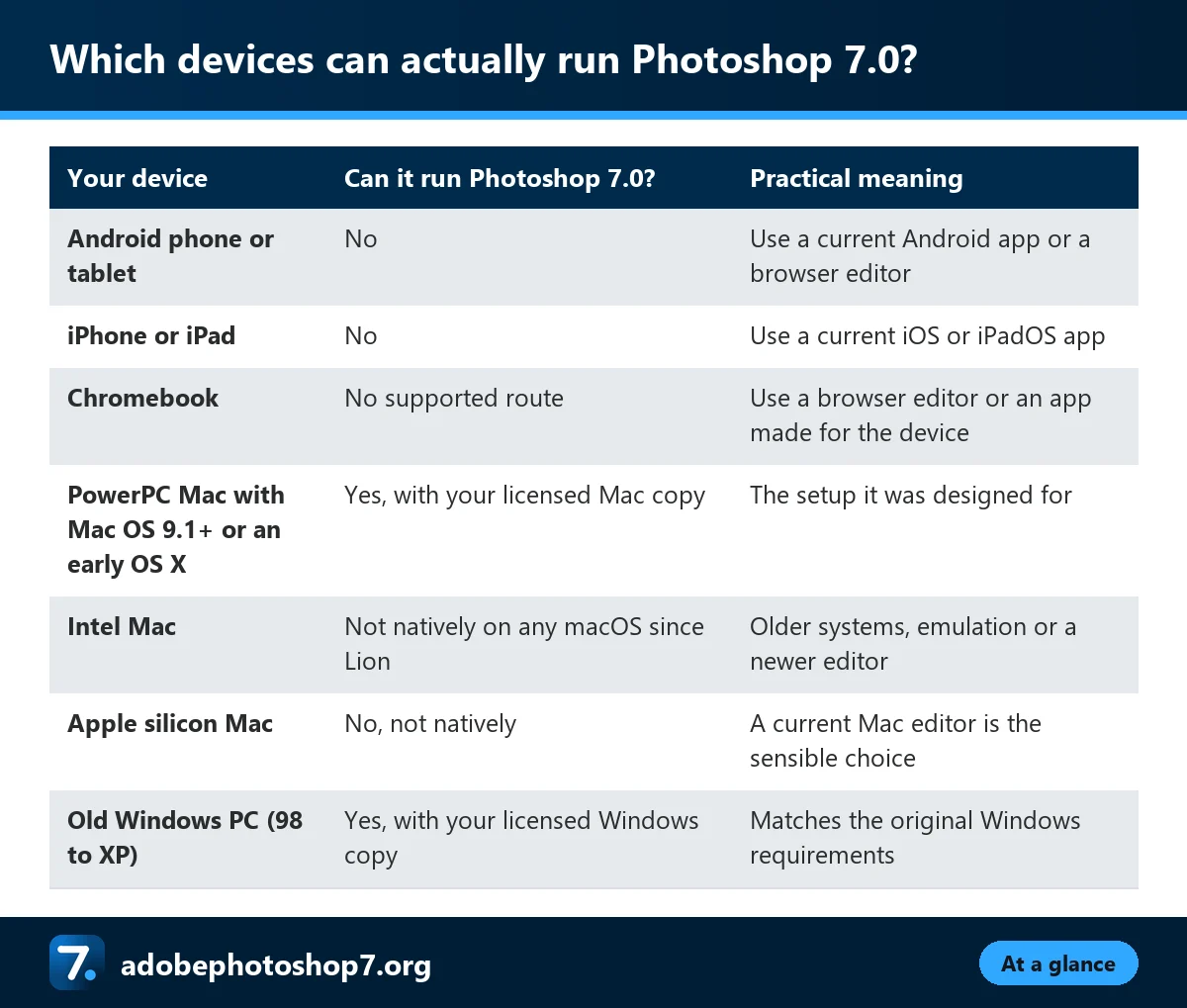
Photoshop 7.0 runs on the computers of its own period: older Windows PCs and PowerPC Macs. The table below sums up where it stands today.
| Your device | Can it run Photoshop 7.0? | Practical meaning |
|---|---|---|
| Android phone or tablet | No | Use a current Android app or a browser editor |
| iPhone or iPad | No | Use a current iOS or iPadOS app |
| Chromebook | No supported route | Use a browser editor or an app made for the device |
| PowerPC Mac with Mac OS 9.1+ or an early OS X | Yes, with your licensed Mac copy | The setup it was designed for |
| Intel Mac | Not natively on any macOS since Lion | Older systems, emulation or a newer editor |
| Apple silicon Mac | No, not natively | A current Mac editor is the sensible choice |
| Old Windows PC (98 to XP) | Yes, with your licensed Windows copy | Matches the original Windows requirements |
| Windows 10 or 11 PC | Not officially supported | It may or may not work; test before relying on it |
If your computer is a newer Windows PC, read the notes on Photoshop 7 on Windows 10 and 11. This page stays with phones, tablets and Macs.
Why "Photoshop 7.0 APK" files are not safe
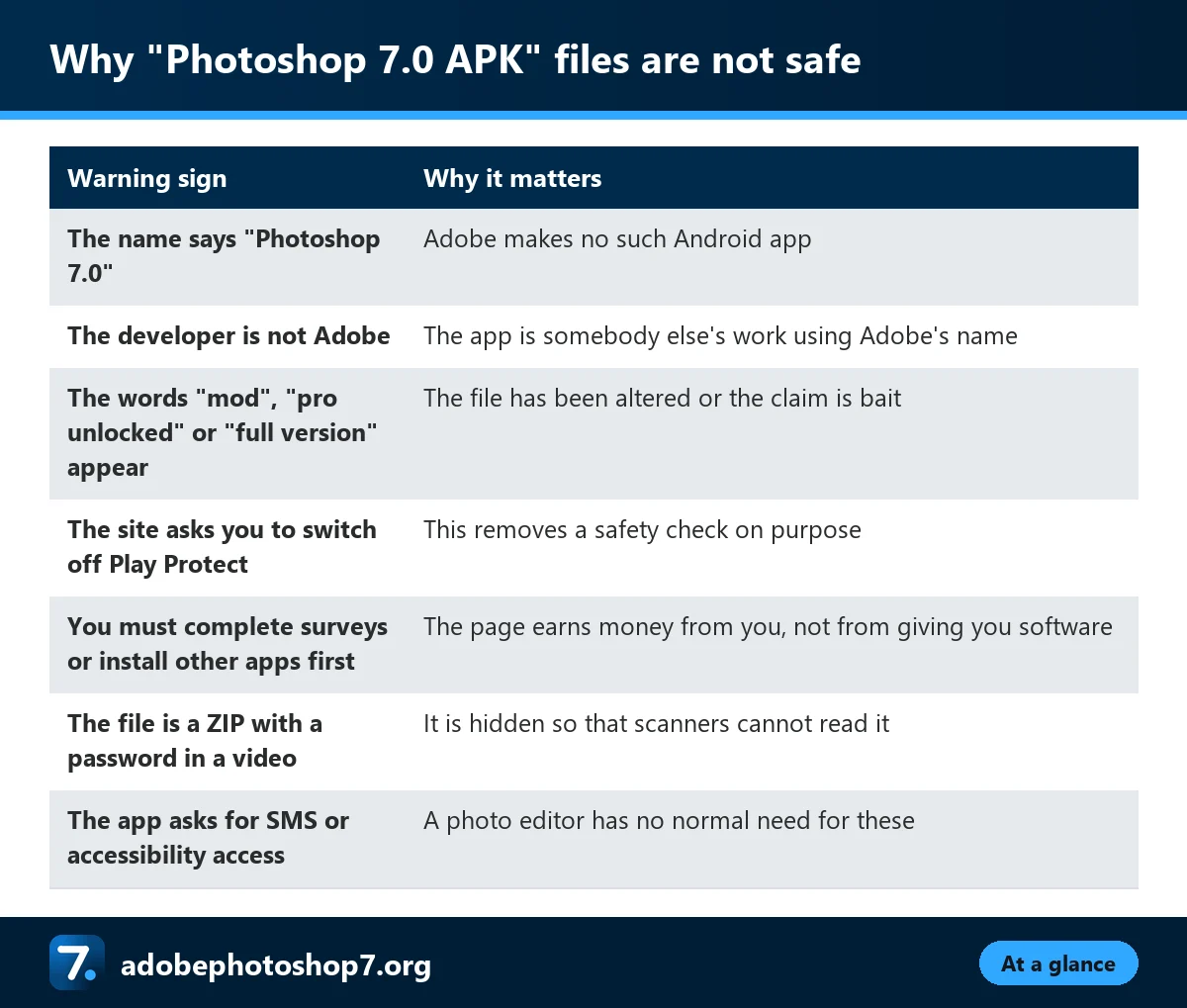
An APK that claims to be Photoshop 7.0 starts with a false claim, so you cannot trust anything else about it. The person who packaged it chose what goes inside. You cannot see that by looking at the icon or the file name.
What a fake APK can do to a phone
An unknown app can ask for access to photos, contacts, messages, notifications or accessibility features. If you approve, it can use that access. Possible results include constant pop-up adverts, battery drain, unwanted subscriptions and stolen information. Google's Android Help warns that downloading apps from unknown sources can put your device and personal information at risk.
Think about what is on your phone. It may hold banking apps, UPI payments, one-time passwords and identity document photos. A photo editor needs access to your pictures. It does not need to read your messages.
| Warning sign | Why it matters |
|---|---|
| The name says "Photoshop 7.0" | Adobe makes no such Android app |
| The developer is not Adobe | The app is somebody else's work using Adobe's name |
| The words "mod", "pro unlocked" or "full version" appear | The file has been altered or the claim is bait |
| The site asks you to switch off Play Protect | This removes a safety check on purpose |
| You must complete surveys or install other apps first | The page earns money from you, not from giving you software |
| The file is a ZIP with a password in a video | It is hidden so that scanners cannot read it |
| The app asks for SMS or accessibility access | A photo editor has no normal need for these |
Is a Photoshop 7 "mod APK" legal?
A modified copy of a paid or proprietary app is not a lawful copy. Photoshop 7.0 remains Adobe's software, even though Adobe no longer sells it. Age does not turn it into freeware. We do not provide APK files, cracks, serial numbers or modified builds, and we do not point you to anyone who does. The page on Photoshop 7 serial numbers explains the licence side.
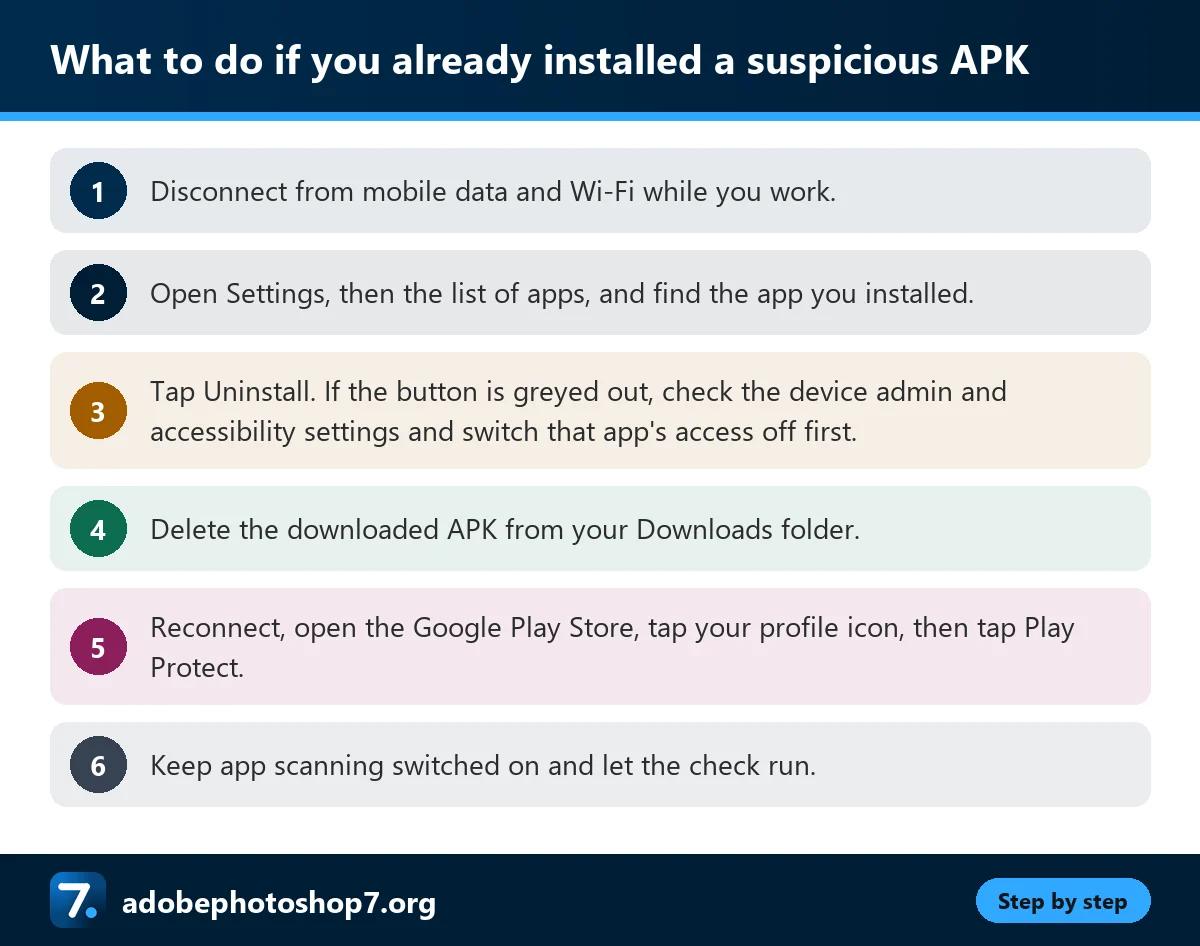
What to do if you already installed a suspicious APK
Remove the app first, then check what it could have touched. Do this soon, even if the phone seems normal. Menu names differ between phone makers, so use the search box in Settings if you cannot find an item.
Remove the app and run Play Protect
- Disconnect from mobile data and Wi-Fi while you work.
- Open Settings, then the list of apps, and find the app you installed.
- Tap Uninstall. If the button is greyed out, check the device admin and accessibility settings and switch that app's access off first.
- Delete the downloaded APK from your Downloads folder.
- Reconnect, open the Google Play Store, tap your profile icon, then tap Play Protect.
- Keep app scanning switched on and let the check run.
Protect your accounts afterwards
Change important passwords from a different device that you trust. Start with your email, because it can reset other accounts. Review recent UPI and bank activity. If you see a payment you did not make, contact your bank at once. Check which apps you allowed to install other apps. On many phones this sits under Apps, then Special app access, then Install unknown apps. Turn that permission off for your browser and file manager.
A reset is reasonable if the app returns after removal, adverts appear over the home screen, or you cannot uninstall it. Back up photos and documents first. Do not restore the suspicious APK from your backup.
Photoshop 7.0 APK for Windows 10, Windows 11 or laptop
A Windows 10 or Windows 11 PC does not need an APK, because APK files are for Android. Searches such as "Photoshop 7.0 APK download for Windows 11" mix up two systems. A genuine Windows copy of version 7.0 came as a Windows installer, usually on a CD.
APK, EXE and Mac installers compared
| File or package | Made for | What it means for Photoshop 7.0 |
|---|---|---|
| APK | Android | Adobe never released version 7.0 in this form |
| Windows setup program (.exe) | Windows | The Windows edition installed this way from original media |
| Mac installer | Mac OS | A separate Mac edition; a Windows PC cannot run it |
| iPhone or iPad app | iOS and iPadOS | Installed from the App Store; no version 7.0 exists |
Can an Android emulator run it on a PC?
An Android emulator runs Android apps, so it only runs the same fake or unrelated APK inside a window. It cannot produce a Photoshop that was never made for Android. Microsoft's own route for Android apps, Windows Subsystem for Android, stopped being available in the Microsoft Store on 5 March 2025.
The lawful route on a Windows laptop
If you own a genuine copy and licence, follow the steps to install Photoshop 7.0 from your own disc or installer. Windows 10 and 11 are not supported for it. If you do not own a copy, our Photoshop 7 download page explains what can and cannot be had lawfully today.
Official Adobe apps you can use on a phone
Adobe offers current mobile apps, and these are what you should install instead of any APK called version 7.0. Get them from Google Play or Apple's App Store, and check that the developer is Adobe. Plans, free features and requirements change, so read the store listing on the day you install.
Photoshop on mobile
Adobe describes Photoshop on mobile as a free app for iPhone and Android, with premium features that need a subscription. At launch, Adobe said the free tools included selections, layers, masks and spot healing, along with some generative AI features. What is free now may differ from the launch offer.
Adobe's technical requirements page lists Android 11 or later, at least 6 GB of RAM, and 8 GB recommended. It states that Android tablets and Chromebooks are not covered. The iPhone requirement has changed between editions of the page, so check the current iOS version there.
Photoshop Express
Photoshop Express is a lighter app for quick fixes: crop, straighten, exposure, filters, collages and similar jobs. Adobe lists Android 8.0 or later as the minimum. It is free to download, and some features need a premium subscription. It is often a better fit than Photoshop on mobile for a modest phone.
Adobe Lightroom on mobile
Lightroom is for improving and organising photographs, not for building layered designs. It suits colour, light and consistency across many pictures. Adobe lists Android 8 or later with at least 4 GB of RAM, and says advanced features depend on the phone. Several tools belong to the paid plan.
Which Adobe app fits which job
Match the app to the task first, then check that your phone meets its requirements.
| Job | Start with | Reason |
|---|---|---|
| Brighten and crop a family photo | Photoshop Express | Few steps, small learning effort |
| Match colour across event photos | Lightroom on mobile | Built for adjusting sets of pictures |
| Combine two photos with masks | Photoshop on mobile | Has layers and masks |
| Make a photo grid for sharing | Photoshop Express | Collage layouts are part of the app |
| Open a layered desktop file | Check on a computer | Phone apps may not handle every layer feature |
Other mobile and browser editors
You are not limited to Adobe, and some free editors cover everyday work well. We are not affiliated with any company named here, and you should check each one's terms yourself.
Snapseed
Snapseed is Google's photo editor for Android and iOS. It is aimed at single-photo adjustments such as curves, healing, perspective and selective edits. A major update, version 4.0, reached Android in May 2026. It is not a layer-based design program in the way desktop Photoshop is.
Photopea in a phone browser
Photopea is an editor that runs in a web browser, so there is nothing to install. Its own pages say it can run on phones and that it does not upload your files. They also recommend a large screen, an accurate pointer and a keyboard for comfort. On a small phone, expect cramped panels. It is a more natural fit on a tablet or computer.
Your phone's built-in editor
The gallery app on most phones can crop, rotate and change brightness. For a form upload or a quick message, that may be enough. Save a copy first, so that your original stays untouched.
More choices for desktops and browsers are compared on the page about Photoshop 7 online and free options.
How to install a photo editor safely on Android
Install from Google Play and check the publisher before you tap Install. The whole check takes a minute and removes most of the risk that comes with look-alike apps.
- Open the Google Play Store app yourself, not a link from a message or video.
- Type the app's exact name, such as Photoshop Express.
- Look at the developer name under the title. For Adobe apps it should be Adobe.
- Skip the sponsored result if it is a different app from the one you typed.
- Read the data safety section and recent reviews.
- Tap Install, then open the app and grant only the access the task needs.
- Before starting a free trial, read the billing period and how to cancel.
Permissions a photo editor may ask for
Access to photos is expected. Camera access makes sense if you shoot inside the app. A request to read SMS, manage calls or control the screen through accessibility is a reason to stop. Newer Android versions let you share only selected photos, which is worth using for private pictures.
A free download does not mean every button is free. Many editors show a lock or crown on paid tools. Check your Google Play subscriptions now and then. Uninstalling an app does not by itself cancel a subscription, so cancel it in the Play Store.
What iPhone and iPad owners should know
An iPhone or iPad cannot run version 7.0, so your choice is among current apps from the App Store. The cautions about APK files apply in a slightly different form here. APK files do not install on Apple devices at all. A web page that offers one to an iPhone user is therefore either mistaken or trying to lead you somewhere else.
Watch for profiles and web "installers"
Be wary if a page asks you to install a configuration profile, trust an unknown business developer or add a calendar subscription before you can "get Photoshop". A photo editor from the App Store needs none of these steps. Close the page. If you already added a profile, look under the VPN and device management area in Settings and remove anything you do not recognise. A work or school phone may carry a legitimate profile, so ask your administrator before removing that one.
Getting photos in and out
iPhones often save pictures as HEIC. Many current apps read it, but older desktop programs and some web tools do not. Export or convert a copy to JPEG when the next step needs it. To keep edits reversible, duplicate the picture in the Photos app first. When you hand a file to a print shop, send the original size rather than a screenshot, which is limited by your screen and may include borders or buttons.
iPad as a middle ground
A tablet gives more room for layers and masks, and a stylus makes selection work much easier. Photoshop, Affinity and browser editors each have their own limits on iPad. Check which tools and file types your regular job needs before you buy a tablet only for editing.
Adobe Photoshop 7.0 for Mac
Photoshop 7.0 did have a real Mac edition, made for PowerPC Macs. It is remembered as the first Photoshop release that ran natively on Mac OS X, while still supporting Mac OS 9. That dual support suited studios that were midway between the two systems.
| Item | Reported requirement for the Mac edition |
|---|---|
| Processor | PowerPC G3 or G4 |
| Operating system | Mac OS 9.1 or 9.2, or Mac OS X 10.1.3 (some sources say 10.1) |
| Memory | 128 MB, with 192 MB recommended |
| Disk space | About 320 MB |
| Display | 800 x 600 with thousands of colours (16-bit) or more |
These figures come from period listings and reference sites. If you have the box or the Read Me file, treat that as your authority.
A Windows disc does not install the Mac program, and the reverse is also true. Check the label on your media and the terms of your licence. Owning one edition does not automatically give you the other.
The Photoshop 7.0 Macintosh Video Workshop disc
This is a training item, not another edition of the editor, although people search for "Adobe Photoshop 7.0 Macintosh Video Workshop". Resale listings describe a training disc with that name, produced by Total Training and associated with the Mac package. It is a video tutorial disc, not the editing program. We found no Adobe page describing its contents, so check the disc label before buying one second-hand.
Can a modern Mac run Photoshop 7.0?
A modern Mac cannot run Photoshop 7.0 natively. The program was built for PowerPC processors. Apple moved to Intel and then to Apple silicon, and removed the layers that once bridged the gap.
The three changes that closed the door
- Classic environment. This ran Mac OS 9 programs inside early OS X on PowerPC Macs. Intel Macs never had it, and Mac OS X 10.5 Leopard dropped it.
- Rosetta. The first Rosetta let Intel Macs run PowerPC programs. Mac OS X 10.7 Lion removed it in 2011.
- 32-bit support. From macOS Catalina 10.15, 32-bit apps no longer run at all.
Does Rosetta 2 help on Apple silicon?
No. The Rosetta on today's Apple silicon Macs translates Intel apps, not PowerPC apps. It shares a name with the older tool but does a different job. Apple also says that from macOS 28, Rosetta will be limited mainly to certain older games.
How to find out which Mac you have
The About window on your Mac names the processor and system version.
- Click the Apple menu in the top-left corner.
- Choose About This Mac. On Mac OS 9 the item is called About This Computer.
- Look for a line labelled Chip or Processor.
- A Chip line with an Apple name means Apple silicon. An Intel processor name means an Intel Mac. PowerPC, G3, G4 or G5 means an older PowerPC Mac.
- Note the macOS or Mac OS X version shown in the same window.
Your options on each kind of Mac
What you can do depends first on the processor and the system version. Work out which Mac you have, then read the matching part below. Do not upgrade or erase an old working Mac until you have thought about what it still does for you.
PowerPC Macs
A PowerPC Mac is the natural home for the Mac edition. If it runs Mac OS 9.1 or later, or an early Mac OS X release, your licensed copy should be within its design range. On Tiger and earlier, Mac OS 9 programs can also run through Classic. Leopard on PowerPC lost Classic, though the OS X side of a program built for it may behave differently from the OS 9 side. Test your own copy before promising work to anyone.
Old hardware brings its own problems. Hard disks wear out, optical drives stop reading and clock batteries die. Copy your artwork to a second place regularly.
Intel Macs on old system versions
An Intel Mac that still runs Snow Leopard 10.6 can use the original Rosetta, which was an optional install on that release. Whether a particular PowerPC program installs and behaves well under it varies. Treat success reports from strangers as hints, not guarantees. Note also that such a system no longer gets security updates, so keep it away from banking, email and unknown downloads.
Intel and Apple silicon Macs on current macOS
On a current macOS there is no direct way to run version 7.0. Dragging an old application folder from a backup will not work. You will see an unsupported or prohibitory symbol, or nothing useful happens. Your realistic choices are a current editor, an emulator, or keeping an old machine for old work.
| Your situation | Sensible choice | Main drawback |
|---|---|---|
| PowerPC Mac still working | Keep using it for old projects | Ageing hardware, no security updates |
| Intel Mac frozen on Snow Leopard | Offline use for legacy files | Compatibility varies; unsafe online |
| Current Mac, occasional edits | Free current editor | Menus differ from what you learned |
| Current Mac, paid client work | Supported current software | Cost or subscription |
| Hobby interest in old software | Emulation with lawful media | Time, speed and setup effort |
Emulation and virtual machines: what to expect
Emulation can imitate an old computer on a new one, but it is a hobby project rather than an easy fix. An emulator pretends to be different hardware. A virtual machine runs another operating system for the same processor family. The first is needed for PowerPC software on a current Mac.
What you need before you start
- A lawful copy of the old Mac or Windows system you plan to run.
- Your own Photoshop 7.0 media and licence for that platform.
- A way to read the disc, or a lawful image made from your own disc.
- Patience for slow screen drawing and awkward file transfer.
- A backup of any files you care about.
Do not download ready-made disk images that already contain Photoshop. They are unlicensed copies, and you cannot know what else is inside them.
Emulator options, supported systems and settings change with each release. A recipe copied from an old forum post often fails on a newer Mac. If you go this way, follow the emulator project's current documentation. Check the licence terms of the system you intend to install.
Running the Windows edition of Photoshop 7 on a Mac
This depends on your Mac's processor, for people who own a Windows copy and use a Mac. A Windows virtual machine on an Intel Mac may run it, subject to Windows and Photoshop licensing. On Apple silicon, the Windows you can virtualise is the Arm edition of recent Windows, which is far outside what version 7.0 was built for. Do not buy virtualisation software only for this purpose without trying a trial first.
Current Mac editors instead of version 7.0
A current Mac editor is the better route for most people, because it installs normally and receives fixes. The choices below are examples, not an exhaustive list.
Adobe Photoshop for Mac
Adobe's current desktop Photoshop is a subscription product. Its requirements page, at the time of writing, lists macOS 14 as the minimum with 8 GB of RAM, and accepts Intel or Apple silicon processors within stated limits. These minimums rise over time. Check your own macOS version against the live page before paying.
Photoshop Elements for Mac
Photoshop Elements is Adobe's separate editor for home users. It is not the same program as Photoshop and has its own licence terms and requirements. Read how long the licence lasts before you buy, because the terms for newer releases differ from the old "buy once" boxes.
GIMP
GIMP is a free, open-source image editor. Its download page offers Mac builds for both Apple silicon and Intel, for macOS 11 Big Sur or later. The same page says GIMP has no official package on the Mac App Store, so a listing there is from a third party. Download from gimp.org.
Affinity
Affinity, now owned by Canva, relaunched in late 2025 as a free app for Mac and Windows, and an iPad version followed. A Canva account is needed, and AI features require a paid Canva plan. There is no Android edition according to current reports. Read the terms before you use it for client work.
Photopea in a Mac browser
Photopea runs in Safari, Chrome and similar browsers without installation. It is useful on a work or college Mac where you cannot install software. Save your file to the computer before you close the tab.
| Editor | Runs on a current Mac | Cost model | Good for |
|---|---|---|---|
| Photoshop (current) | Yes, if requirements match | Subscription | Professional workflows |
| Photoshop Elements | Yes, if requirements match | Paid licence | Home photo projects |
| GIMP | Yes, macOS 11 or later | Free, open source | Layered editing without payment |
| Affinity | Yes | Free core with a Canva account | Photo, layout and vector work |
| Photopea | In a browser | Free with optional paid plan | Quick PSD access |
Moving old Photoshop 7 files to a new device
Your old artwork is usually easier to rescue than your old program. PSD is widely read by current editors, so copy the files first and sort out software second.
Copy files from an old computer safely
- Make a folder on the old machine named for the project or year.
- Gather the PSD files, original photos, fonts list and any exported copies.
- Copy the folder to a USB drive or external disk that both computers can read.
- On the new device, copy the folder to local storage before opening anything.
- Open a few important files and compare them with a printout or old export.
- Keep the old copy until you are satisfied that nothing is missing.
Very old Macs may use ports and disk formats that a new computer does not read directly. A network transfer or an intermediate computer can help. Mac files from the OS 9 period sometimes lack a file extension. Adding .psd to a copy often lets a newer program recognise a real Photoshop document.
Check layers, text and fonts
Text layers depend on fonts. If the new device lacks a font, the editor substitutes another and line breaks may move. This matters for wedding cards, shop boards and certificates. Install fonts you are licensed to use, or keep a flattened copy that shows the intended appearance.
When you send work to a phone or a print shop, pick the export format by what must survive.
| Format | Keeps layers? | Use it for |
|---|---|---|
| PSD | Yes | The master file you will edit again |
| TIFF | Optional, depending on settings | Print exchange and archiving |
| JPEG | No | Phone viewing, messaging, form uploads |
| PNG | No | Graphics with transparency |
In Photoshop 7.0, use File > Save As and tick the copy option so that your layered master stays as it is. For web-sized pictures, File > Save for Web lets you compare file size and quality.
Sending phone photos back to Photoshop 7.0
The traffic can also go the other way. Photoshop 7.0 does not understand HEIC, which many iPhones use, or newer formats such as WebP. Convert those to JPEG or PNG first. Transfer the original file by cable or a file-sharing option rather than a chat app, which may shrink the picture.
Opening newer files in version 7.0
A PSD made in a recent program can use features that did not exist in 2002. Version 7.0 may warn you, drop information or show a flattened version. Ask the sender for a TIFF or PNG copy if the layout matters. Never save over the sender's original.
Phone workflows for common jobs
Most jobs that send people hunting for an APK can be done with a short, ordinary workflow. Choose the task, not the brand name. Each method below keeps your original file safe.
Passport and ID photos
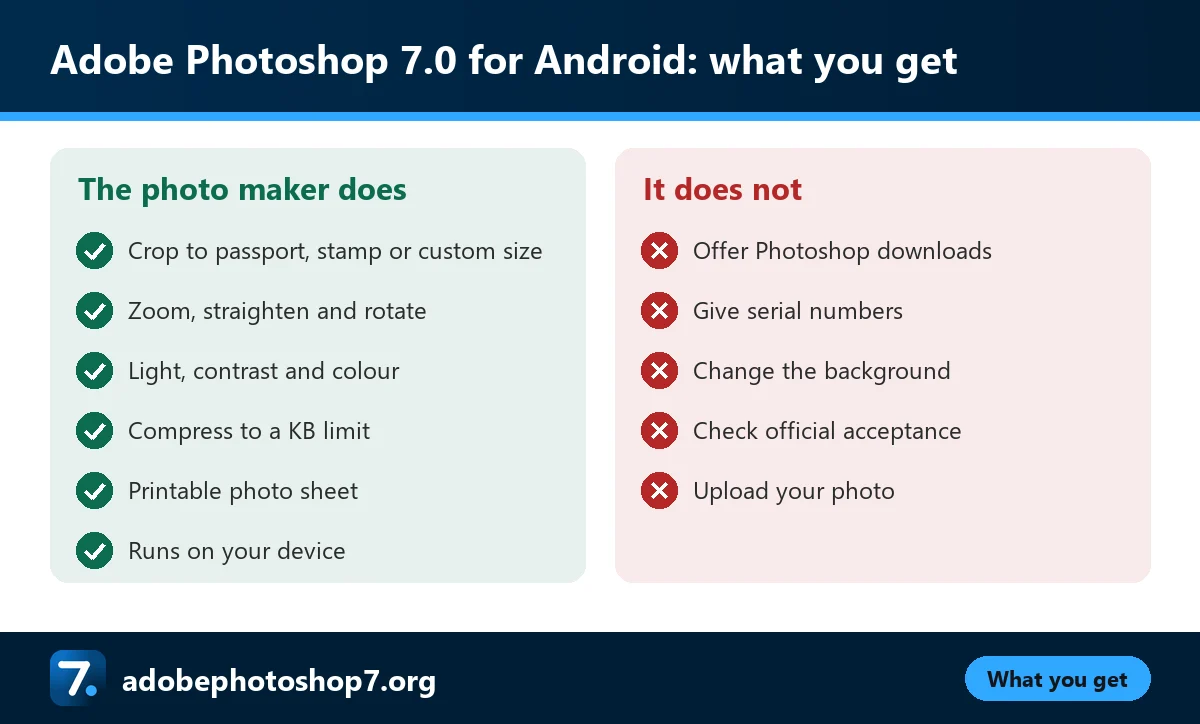
Stand in even light against a plain, light background and ask someone else to take the picture. Then use our passport size photo maker. It crops to sizes such as 35 x 45 mm or 630 x 810 pixels, adjusts brightness and contrast, and prepares a 4 x 6 inch or A4 sheet. The picture stays in your browser.
It cannot replace the background, retouch or confirm that an office will accept the photo. It opens JPG, PNG and WebP files, not HEIC. Convert an iPhone HEIC picture before you begin. Print the sheet at 100% scale.
Fixing a dull or yellow photo
- Duplicate the photo in your gallery so the original survives.
- Open the copy in Snapseed, Photoshop Express or Lightroom.
- Correct white balance first, until white cloth or paper looks neutral.
- Raise exposure a little, then recover bright areas such as foreheads and white shirts.
- Add contrast gently and stop before shadows turn solid black.
- Zoom in to check skin, then export at full quality.
Removing a background
Several mobile editors offer automatic background removal, sometimes as a paid feature. Check hair, spectacles and fingers closely, because automatic selection often struggles there. For hand-done techniques on a computer, see removing a background in Photoshop 7.
Adding names, dates and posters
For a greeting or a small notice, use an editor with text layers. Keep two fonts at most and leave a margin around the words. Check spelling with another person before printing. Make the canvas at the final shape, so the print shop does not have to crop your text.
Reducing file size for an online form
Read the form's limits first: pixels, kilobytes and file type. Crop to the required shape, resize to the required pixels, then export as JPEG and check the size. If it is still too large, lower the quality in small steps. Do not resize the same exported file again and again, because each save can lose detail.
Phone, tablet or computer: choosing where to edit
A phone is fine for quick corrections, while long or exact work is easier on a computer. The device matters as much as the app.
| Need | Phone | Tablet | Computer |
|---|---|---|---|
| Crop and brighten | Comfortable | Comfortable | Comfortable |
| Precise selection around hair | Difficult | Manageable with a stylus | Comfortable |
| Many layers and long text | Cramped | Manageable | Best suited |
| Batch work for events | App dependent | App dependent | Best suited |
| Exact print sizes | Possible with care | Possible with care | Easiest to verify |
| Old PSD archive | Risky | Check results | Best suited |
If your phone is old or low on memory
Large photos and layers need memory. If an app closes suddenly, free some storage, close other apps and work on a smaller copy. Prefer the lighter Express app or the built-in editor over a heavy one. An old Android version may not be offered newer apps at all, and that is not a reason to install an unknown APK.
If you only have a cyber cafe or shared computer
Use a browser editor, avoid saving identity documents on the machine and sign out of every account. Delete downloads and empty the recycle bin before you leave. Copy your finished file to your own drive or send it to yourself.
Notes for studios, cyber cafes and students
Shops and learners have different pressures from home users, so plan around daily work and lawful licences. A customer waiting at the counter is not the moment to experiment with an unknown file.
Photo studios
Keep one tested computer for printing and do not install phone-style emulators or "free full version" bundles on it. If customers send pictures by phone, ask for the original file. If your studio still uses a licensed copy of version 7.0, keep the media, licence proof and a written note of which computer it is installed on.
Cyber cafes
Customers may ask you to install "Photoshop 7 on my mobile". Explain that it does not exist and offer a lawful app from the official store instead. Do not transfer APK files between customers' phones. Check that each computer's software is licensed for business use.
Students
You can learn the ideas of layers, selections and colour correction in any capable editor. The skills carry across, even where menu names differ. If your syllabus names version 7.0, ask your institute for access on its licensed computers. At home, practise concepts in a free editor and note the differences. Our Learn Photoshop 7 guides follow the classic interface.
Mac users who learned on Windows
Mac editions generally use the Command key where Windows uses Ctrl, and Option where Windows uses Alt. Menu placement can differ too, especially on Mac OS X. Use the Photoshop 7 shortcut keys list as a starting point, and confirm combinations in your own copy.
A five-minute test before you trust a new editor
Try any new editor on a spare photo before you use it for paid or urgent work. A short trial shows problems that a store listing does not mention. Use a picture with no private details.
- Open a full-size photo and note its pixel dimensions.
- Crop it to the shape you use most often.
- Change brightness, then undo the change to see how undo behaves.
- Add a line of text, if your work needs text, and check how fonts look.
- Export the result and find the saved file in your gallery or files app.
- Compare the exported dimensions and file size with what you expected.
- Look for a watermark, and for any charge that appeared only at the export step.
If the app fails at step five or seven, remove it and try another. Write down the settings that worked, so that a family member or shop assistant can repeat them. For colour-critical work, view the exported file on a second screen as well. Phone displays often show colours more vividly than a print will.
Repeat the test after a large update. App makers move buttons, change which tools are free and raise minimum system versions. A workflow that worked last year may need a different tool today, and it is better to find that out on a spare photo than with a customer waiting.
Tips for avoiding fake downloads and wasted time
These habits protect your phone, your Mac and your files. Apply them before you install anything that uses a famous name.
- Search inside Google Play or the App Store, not through a video description.
- Read the developer name before the star rating.
- Treat "7.0", "mod" or "premium unlocked" on a phone app as a reason to leave.
- Never switch off Play Protect or Mac security to make an installer run.
- Do not type serial numbers, bank details or one-time passwords into a download page.
- Check the app's minimum Android, iOS or macOS version before downloading or paying.
- Keep an untouched original of every photo and PSD.
- Cancel unwanted trials through your store account, not only by deleting the app.
- Ask which file format the print shop or portal needs before you edit.
- Update your phone and apps from official sources.
macOS checks downloaded apps and may block one whose developer cannot be verified. Apple warns that running unsigned or unnotarised software can expose your Mac and your information to malware. An "Open Anyway" choice exists in Privacy & Security settings, but it is not a fix for a download you do not trust. Delete the file and get the program from its maker.
Ask who runs the page, what right they have to give out the software, and what they want from you. A site that cannot answer the second question should not get your trust. This applies to well-known download portals as much as to unknown ones when they list Photoshop 7.0. We do not endorse any of them.
Questions to settle before you pay for anything
Spend a few minutes on these checks, and you are less likely to buy something that does not fit your device or work.
About the app.
- Does the listing support your exact device type, including tablet or Chromebook?
- Which tools are free, and which show a lock?
- Does it need an account or a constant internet connection?
- Can it export the size and format that you need?
- Where are your files stored: on the device, in a cloud account or both?
About privacy. Customer photos, identity documents and children's pictures deserve care. AI features may send images to a server for processing, so read the app's notice before using them. If you are unsure, edit sensitive pictures with a tool that works on the device itself.
About old boxed copies. A second-hand disc is not automatically a usable licence. Adobe's licence terms control whether and how a copy can be transferred. A seller's loose disc with a handwritten number is not proof of anything. Also check the platform, Windows or Mac, and whether you have hardware able to run it.
Troubleshooting common situations
Most problems on this topic come from a mismatch between the file and the device. Find your message or symptom below.
"App not installed" on Android
This can appear when the package is damaged, unsupported, signed differently from an installed app or blocked for safety. With a supposed Photoshop 7 APK, do not hunt for a way around it. Delete the file. For a genuine app, free storage space and install it again from Google Play.
Google Play says the device is not compatible
The app's requirements may exclude your Android version, memory or device type. Photoshop on mobile, for example, is not offered for every tablet. Choose a lighter app or a browser editor. A copied APK of the same app from elsewhere is not a safe workaround.
A Mac will not open the old installer
On Intel and Apple silicon Macs with current macOS, a PowerPC installer cannot run. Changing permissions or security settings will not alter the processor requirement. Keep the disc, move your artwork to a current editor and, if you must run the original, use compatible old hardware.
The app closes while editing a large photo
Work on a smaller copy, close other apps and keep some storage free. Reduce the number of layers by merging only in a duplicate. If it still closes, finish the job on a computer.
The saved picture looks soft or small
Many apps and chat services shrink pictures. Check the export settings for maximum size and quality. Send files as documents when a chat app offers that choice. Compare pixel dimensions with the original before printing.
Frequently asked questions
How to download Adobe Photoshop 7.0 for Android?
You cannot, because Adobe never released Photoshop 7.0 for Android. Any file offering it is a different or altered app using the name. Install Photoshop on mobile or Photoshop Express from Google Play, check that the developer is Adobe, and read which features are free before you subscribe to anything.
Is the Adobe Photoshop 7.0 APK real?
No Adobe Photoshop 7.0 APK is real in the sense of being Adobe's version 7.0. An APK file may well install and open, but it is something else underneath. Treat it as an unknown app from an unknown author. If you installed one, uninstall it, run Play Protect and review your permissions.
Can I install a Photoshop 7.0 APK on Windows 11?
Not usefully. APK files are Android packages, while Photoshop 7.0 for Windows used a normal Windows installer. Windows Subsystem for Android is also no longer offered in the Microsoft Store. If you hold a genuine Windows copy, use its own installer and remember that Windows 11 is not a supported system for it.
Is there a Photoshop 7.0 download for mobile phones?
There is no mobile download of Photoshop 7.0 for Android phones or iPhones. The desktop program expects Windows or Mac OS, a mouse and a keyboard. Mobile users have newer choices, including Adobe's own mobile apps, Snapseed and browser editors. Pick by the job, such as colour correction, collage or layered editing.
Will Photoshop 7.0 run on a MacBook?
A recent MacBook will not run it natively, whether it has Apple silicon or an Intel chip with a current macOS. The program was made for PowerPC Macs. Emulating an old Mac is possible for experienced users, but it is slow to set up and needs your own lawful system software and Photoshop licence.
Is there a free Photoshop 7.0 old version for Mac?
No lawful free copy is offered by Adobe. Photoshop 7.0 is proprietary software, and its age does not change that. If you own the original Mac disc and licence, you can use it on a compatible old Mac. Otherwise choose a free editor such as GIMP or Affinity, after reading its terms.
Can I use my old serial number in a mobile app?
No. A Photoshop 7.0 serial number belongs to that desktop product and licence. Adobe's current mobile apps do not take it as a key; they work with an Adobe account and, for premium tools, a subscription. Keep your serial number private, and do not type it into any website or APK that asks for it.
Is Photoshop Express the same as Photoshop 7.0?
No, they are different products. Photoshop Express is a mobile app for quick adjustments, filters and collages. Photoshop 7.0 is a 2002 desktop editor with detailed layer, channel and path tools. The shared word in the name does not mean the menus, tools or file handling match.
Can I open PSD files on an Android phone?
Some editors, including browser-based Photopea, can open PSD files on a phone. How faithfully layers, text and effects appear depends on the editor and the file. Work on a copy, compare it with the original on a computer, and do not overwrite your only PSD from a phone.
Which app should I use for passport photos on a phone?
You may not need an editing app for this job. A passport and stamp photo maker in your browser can crop to standard sizes, adjust brightness and contrast, and build a print sheet. It does not change backgrounds or check official acceptance, so photograph yourself against a suitable background and read the current rules.
Can an iPhone or iPad run Photoshop 7.0?
No. Photoshop 7.0 was never released for iPhone or iPad, and neither device can run a Windows or PowerPC Mac program directly. Adobe offers current apps for these devices instead. Check the App Store listing for your iOS or iPadOS version, the developer name and which features need payment.
Why do so many websites list a Photoshop 7.0 APK?
People search for the phrase, so some sites create pages to capture those visits. A page title proves nothing about the file behind it. Such pages may earn from adverts or bundled installs, and some deliver harmful apps. The safe test is simple: Adobe made no Android version 7.0.
Does emulation make Photoshop 7.0 work on Apple silicon?
It can be possible to run an old system inside an emulator and install licensed software there, but results are not guaranteed. Expect extra setup, slower performance and awkward file sharing. You still need a lawful operating system copy and your own Photoshop licence. For regular work, a current Mac editor is far less trouble.
What is the Photoshop 7.0 Macintosh Video Workshop?
It appears to be a video training disc by Total Training that accompanied the Mac version, based on how second-hand listings describe it. It teaches the program and is not a copy of Photoshop. We could not find an official Adobe description, so confirm the contents and platform from the disc itself.
Do I need an internet connection for mobile editing apps?
It depends on the app and the tool. Basic cropping and colour changes often work on the device, while sign-in, cloud storage and AI features usually need a connection. Open the app once with internet, then test your regular task in aeroplane mode before relying on it somewhere without signal.
Our recommendation for phone and Mac users
Do not install anything called Photoshop 7.0 on a phone; pick a current app from an official store and keep version 7.0 for computers that can truly run it. This advice rests on compatibility and licensing facts, not on a test or ranking of apps.
| You are | Our suggestion |
|---|---|
| Android user wanting quick fixes | Photoshop Express, Snapseed or the gallery editor |
| Phone user needing layers | Photoshop on mobile, if your device meets the requirements |
| Someone making a passport print | The browser photo maker, then print at 100% |
| Mac user without any licence | Try GIMP, Affinity or Photopea first |
| Mac user with paid design work | Supported current software that meets client file needs |
| Owner of an old Mac disc and licence | Use it on a PowerPC Mac, and export your files for the future |
If your work depends on an old plug-in or an exact old workflow, keeping a legacy computer may make sense. If a college or employer provides software, use that. If Adobe or another maker changes requirements or free features, trust their current page over any older summary, including this one.